
Introduction
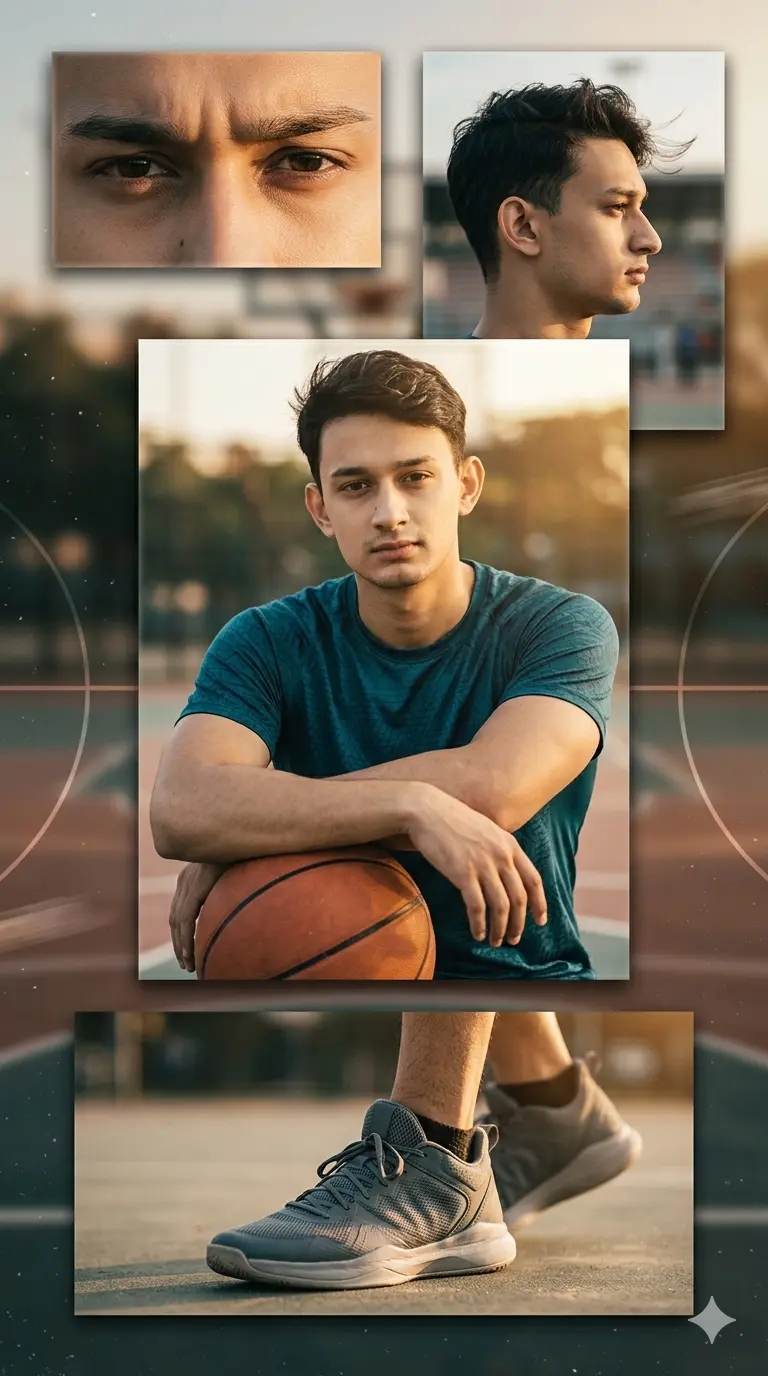
Most sports-style AI edits either look like a flat product shot of the sneakers or lose the person’s face entirely once the collage adds multiple angles — getting a basketball-themed portrait that actually feels like real sports photography, with the sneaker looking worn rather than floating, is trickier than it looks. This Gemini basketball sports edit prompt for boys solves that by structuring the output into four distinct panels — an eye close-up, a side profile, a main mid-shot leaning on a basketball, and a natural on-foot sneaker shot — so the same face and outfit carry through consistently instead of the collage feeling like four unrelated images stitched together.
The prompt leans on warm golden-hour lighting, muted amber and teal color grading, and subtle film grain to give the whole set a professional sports-photography look in Gemini, rather than the flat, overexposed feel a lot of AI sports edits end up with. It works especially well for boys who want an athletic, basketball-court aesthetic for Instagram or Pinterest without it looking like a generic jersey product photo.
Prompt: 4-Frame Basketball Style Collage
How to Use
- Upload a clear, well-lit selfie showing your face straight-on, Panel 1’s extreme eye close-up depends on sharp source detail around the eyes and brow, so blurry or low-res selfies will make that panel look soft.
- Paste the prompt as written; don’t trim the sneaker-panel instructions, since Gemini needs the explicit “not a product shot, must show the foot wearing it” language repeated to avoid generating a detached, floating shoe.
- If you want a specific jersey color or team logo, add that detail directly into the Panel 3 clothing description rather than after generation, Gemini follows outfit color instructions more reliably when they’re specified upfront in the same panel block.
- Since this prompt requires consistent golden-hour lighting across all four panels, avoid uploading a selfie taken in harsh overhead light or indoor fluorescent lighting, as that mismatch can make Gemini’s color grading look uneven between panels.
Tips for Best Results
- Panel 4 (the sneaker shot) is the one most likely to come out looking like a floating product image despite the prompt’s instructions — if that happens, regenerate and explicitly add “shoe must be clearly attached to a visible leg and ankle” in your follow-up.
- The side-profile panel (Panel 2) sometimes softens the jawline more than expected under the wind-swept hair direction; if the face looks slightly off from your main portrait, ask Gemini to match Panel 3’s jawline and skin tone exactly.
- Golden-hour lighting consistency across all four panels is the hardest part to get right in one pass — if Panel 1 or 2 ends up cooler or flatter than the main panel, a quick re-prompt asking for “matching warm amber tone across all panels” usually fixes it.
FAQs
Why does the sneaker in Panel 4 sometimes look like a product photo instead of being worn?
Gemini can default to studio-style product framing for shoes unless explicitly told otherwise — if this happens, regenerate and repeat that the sneaker must be shown mid-stance on a visible foot and ankle, not isolated against a plain background.
Can I use a different sport instead of basketball with this same 4-panel layout?
Yes — keep the panel structure and lighting instructions unchanged, and just swap the basketball prop in Panel 3 and the court background description for your sport of choice, such as a football or a running track.
Why does my jersey look sleeveless even though the prompt says half-sleeves only?
This usually happens when the uploaded selfie is a close-up crop that doesn’t show the shoulder area clearly — uploading a photo where your shoulders and upper arms are visible gives Gemini a better reference to keep the half-sleeve style consistent.
Conclusion
This Gemini basketball sports edit prompt for boys turns a single selfie into a cinematic, athletic 4-panel collage that feels closer to a real sports photoshoot than a typical AI edit. The golden-hour lighting and realistic sneaker detail are what set it apart, so it’s worth a regenerate or two on Panel 4 if the shoe doesn’t look fully worn on the first try. Give it a shot with your own photo and tag us on Instagram @image_promptlab — we’d love to see your version. If you swap in a different sport or jersey style, let us know how it turned out.