
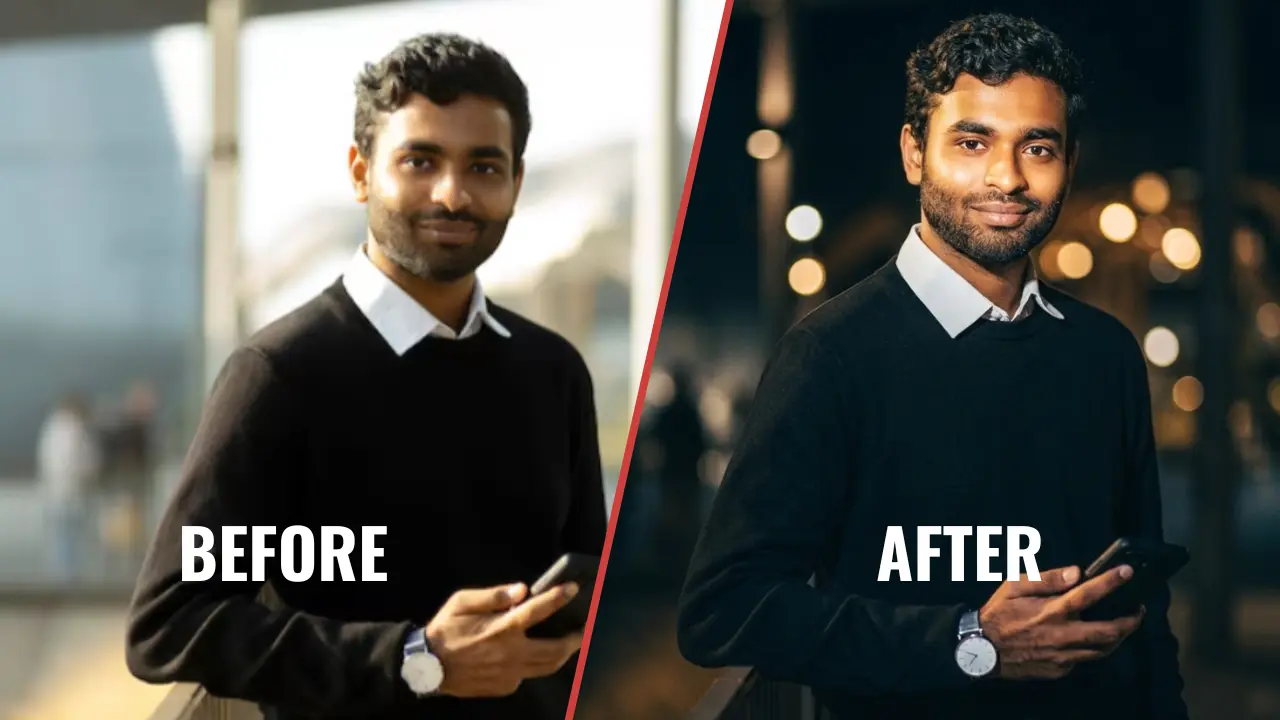
Picture a regular night photo suddenly looking like a frame pulled from a music video, with a strong warm flash lighting up the face while the background stays dark and moody. This Gemini AI night flash portrait prompt does exactly that, taking any nighttime photo and giving it a bold, high contrast, cinematic finish in seconds. It keeps the original background lights, shadows, and night atmosphere intact, while adding a sharp front facing glow across the face, cheekbones, and hair that makes the subject stand out instantly. The best part is that this single prompt is not limited to one type of photo, it works just as well for a solo portrait, a couple shot, or even a small group, which makes it one of the more flexible prompts in this style.
The night flash cinematic portrait prompt
Copy the prompt below exactly as written, along with your photo, and paste it into Gemini or ChatGPT.
Bold Night-Flash Portrait
How to use this Gemini AI night flash portrait prompt
This prompt is simple to run, even if it is your first time using Gemini.
- Open the Gemini app or the Gemini website, and make sure you are signed in to your account.
- Upload a clear nighttime photo, whether it is a solo shot, a couple photo, or a small group, where the faces are visible even in low light. A photo where the existing background already has some lights or glow in it tends to give the richest result.
- Copy the prompt above exactly as it is written, and paste it into the Gemini chat box right under your uploaded photo.
- Submit the prompt and let Gemini generate the image. This usually takes less than a minute, even for group photos with more than one face to light.
- Review the result. Check that the faces still look like the original photo, that the flash lighting falls naturally on the face, and that the background night atmosphere still feels real rather than artificially bright.
- If a face changes too much or the flash looks too harsh, type a quick follow up message such as “keep the faces exactly as the reference photo, only adjust the lighting” and ask Gemini to regenerate the image.
If you want a prompt built around your own lighting style or photo type, use our free Custom Prompt Generator on this page.
Tips for best results
- Start with a photo where faces are at least partly visible, even if the original lighting is dim, since Gemini uses your existing photo as the base before adding the flash effect. A photo where you can already make out basic facial outlines in low light tends to translate better than one that is almost completely black.
- This prompt is built to enhance your existing background lights rather than replace the whole scene, so a photo with some visible night lights, signs, or ambient glow in the background usually gives a richer result. Outdoor night shots near streetlights, markets, or city skylines tend to work especially well with this effect.
- If the flash effect feels too intense or too soft for your taste, add a line to the prompt asking for a stronger or softer front facing light, and if any face changes too much, ask Gemini to regenerate while strictly preserving the uploaded facial features. You can also ask it to keep the background slightly darker if you want more contrast between the subject and the scene.
Related prompts you might also like
If you enjoyed this prompt, here are some other styles you might love. For a softer, hazy evening look, the 7 trending lofi dusk prompts for Instagram night glow portraits offer a more muted alternative to this bold flash style, with a gentler color palette. If outdoor daylight portraits are more your interest, the Gemini AI prompt for girl in grass with tulip gives you six dramatic poses in a tulip field instead, built around natural sunlight rather than flash. And for something festive, the Eid ul Adha photo prompt with animal cinematic flash portrait pack uses a similar flash style built around the occasion, with its own set of poses to try.
For city nights, the neon nights urban portrait prompt for boys is a perfect match, and do not miss the trending Spiderman photo prompts.
Frequently asked questions
How do I use this Gemini AI night flash portrait prompt?
Copy the prompt text exactly as written, upload your nighttime photo, and paste the prompt right after it in Gemini. Submit it and Gemini will generate the bold flash lit portrait based on the lighting and mood described in the prompt, usually within a minute.
Can I use this prompt for a couple or group photo instead of a solo shot?
Yes, this prompt is written to work on solo portraits, couple photos, and small group shots alike, since it focuses on lighting the subjects rather than changing the number of people. Just make sure every face in the original photo is reasonably visible before you upload it, so Gemini has enough detail to light each person evenly.
Try this prompt on your own night photo
This single prompt gives you an easy way to turn a regular nighttime photo into a bold, cinematic portrait with a strong front facing glow and a realistic dark background. The Night-Flash Cinematic Portrait Enhancement Gemini AI prompt works whether you are creating it for yourself, your partner, or your friends, which makes it one of the more versatile prompts to keep on hand. If you want a version tuned to your own lighting preference, try our free Custom Prompt Generator and create something made just for your photo. We would love to see how yours turns out, so feel free to share your favorite result in the comments or tag us on Instagram.
More after dark looks: the neon nights photo prompts and the Spiderman photo prompts.