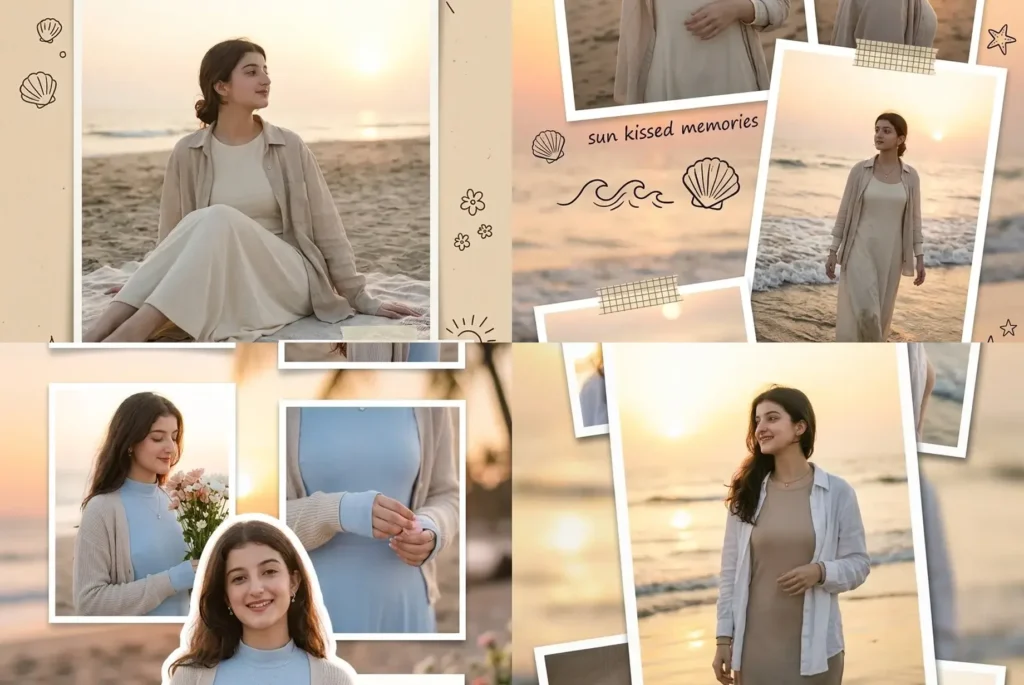
To get an aesthetic beach collage edit for girls, upload one clear front-facing portrait into Gemini and paste a prompt that locks your identity while building out a multi-frame layout around it, that’s the whole process, no separate editing app needed. Most beach edit attempts fall apart because the AI changes the outfit or face slightly between each frame in the collage, which is exactly what these four prompts are built to prevent.
Each prompt here uses the same girl throughout every frame, the same sunset beach setting, and a different visual treatment: soft floral floating frames, taped scrapbook photos, a diary page with doodles, and a casual photo stack layout. Whether you’re using Gemini or ChatGPT for the edit, the underlying idea is identical: one strong identity reference photo, one consistent outfit, and a layout prompt that tells the AI exactly where each frame should sit.
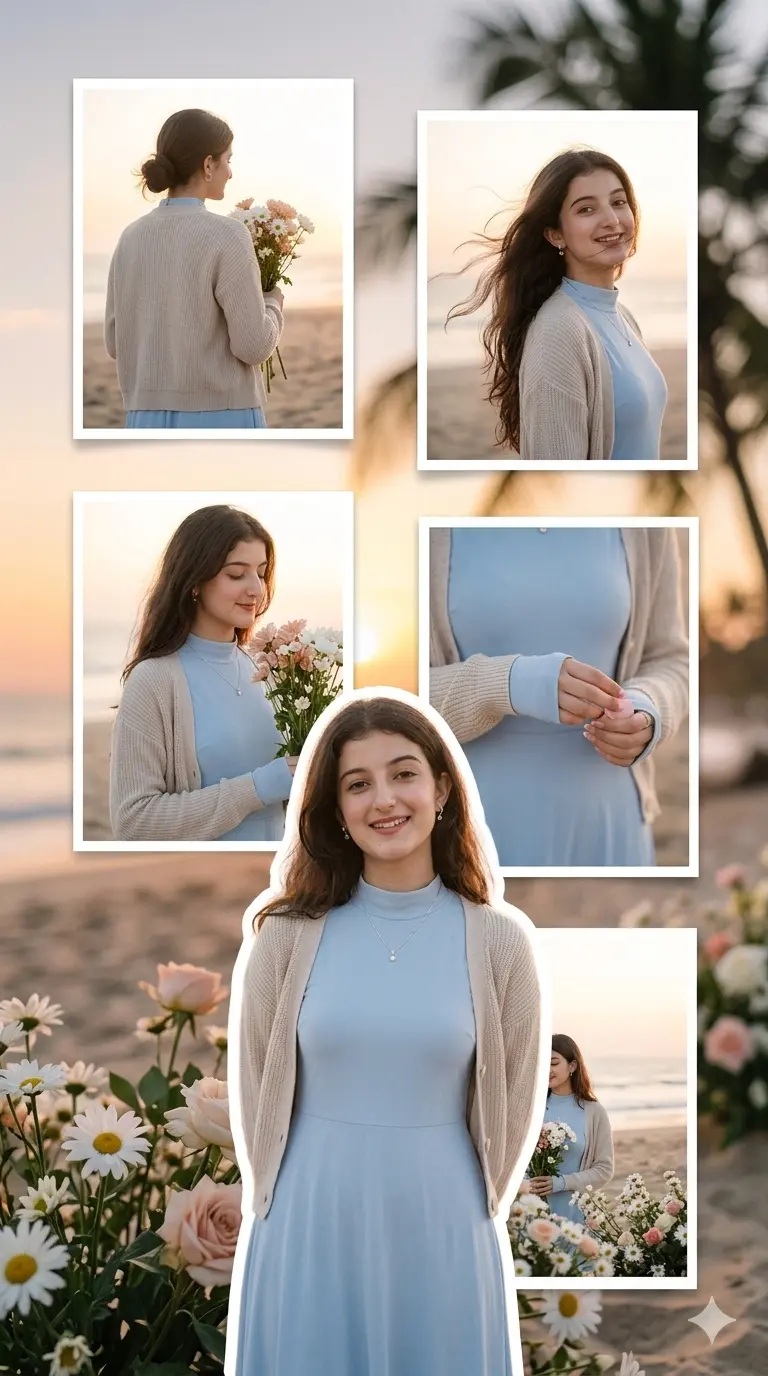
Transform the uploaded girl portrait into a 9:16 vertical sunset beach collage, preserving the exact facial identity, hairstyle, skin tone, expression, and realistic human details.
Use the uploaded portrait only as an identity reference. The same girl must remain accurate in every frame.
Outfit Consistency (New Dress Styling):
All photos must show the exact same outfit:
A modest full-covered soft pastel blue maxi dress with long sleeves, a high-neck design, and flowing fabric.
Paired with a light beige knitted cardigan (keeping it beachy yet covered) and minimal delicate jewelry (like a small bracelet or ring).
Do not change the outfit in any frame. Keep the same dress throughout the collage for a consistent and natural feel.
Main Subject (Natural Poses):
Create one large front portrait of the girl in the lower center foreground. She should look relaxed, elegant, and natural, with a calm expression, possibly holding a small bunch of flowers or standing among floral accents on the beach.
Add a soft white outline around her to gently highlight her without overpowering the natural setting.
Add a soft warm shadow to bring depth to the portrait.
Creative Concept:
The overall look should feel romantic, minimal, and calming, with sunset hues creating a dreamy background. Floral accents (such as white daisies, blush-colored blooms, and soft beach flowers) should complement the girl’s natural elegance, blending seamlessly with the beach aesthetic.
Floating Frames (Natural Poses):
Create 5 unique floating frames behind the main subject, each capturing a different angle, pose, or detail. Keep the layout clean and simple, with slight overlaps and a natural flow.
Top Left Frame: A back-angle shot of the girl standing tall, holding flowers or floral accents near her face, capturing the soft sunlight glow and creating a silhouette effect.
Top Right Frame: A side-angle portrait with her hair blowing in the beach breeze, showing her natural movement in the soft ocean air.
Center Left Frame: A chest-up portrait of the girl holding flowers in her hand, looking at them gently with a peaceful expression.
Right Middle Frame: A detail shot of her hand, holding flowers, sleeve, or petals, giving a softer, more intimate look.
Bottom Behind Main Frame: A wider floral beach portrait, with the girl partially hidden behind the main cut-out, showing the full beach setting with soft ocean and sand tones in the background.
Background:
Create a soft sunset beach background with blurred ocean horizon, warm sky gradients, and soft sand tones.
Add floral accents, palm silhouette bokeh, and gentle sunset glow to create a calm, natural beach setting.
Do not use the uploaded image as the background.
Style & Effects:
Dreamy soft glow around the girl and flowers to enhance the sunset warmth.
Subtle film grain for a more organic, human-made texture.
Soft blur around the edges of the frames to keep the focus on the girl and her flowers.
Light bokeh effects in the background to enhance the dreamy atmosphere.
Natural shadows and warm cinematic depth to bring richness to the sunset scene.
Negative Controls:
No text
No watermark
No logo
No distorted face
No extra limbs or hands
No broken fingers
No outfit changes between frames
No over-complex design — keep it simple, natural, and clean.
Additional Notes:
The layout should feel like real moments captured at the beach during sunset — simple, intimate, and peaceful.
Focus on the flowers, natural beach movement, and soft sunset glow, with each frame offering a different perspective on the girl’s relaxed beach moment.
The natural flow of wind, hair, flowers, and sunset light should be central to the design.
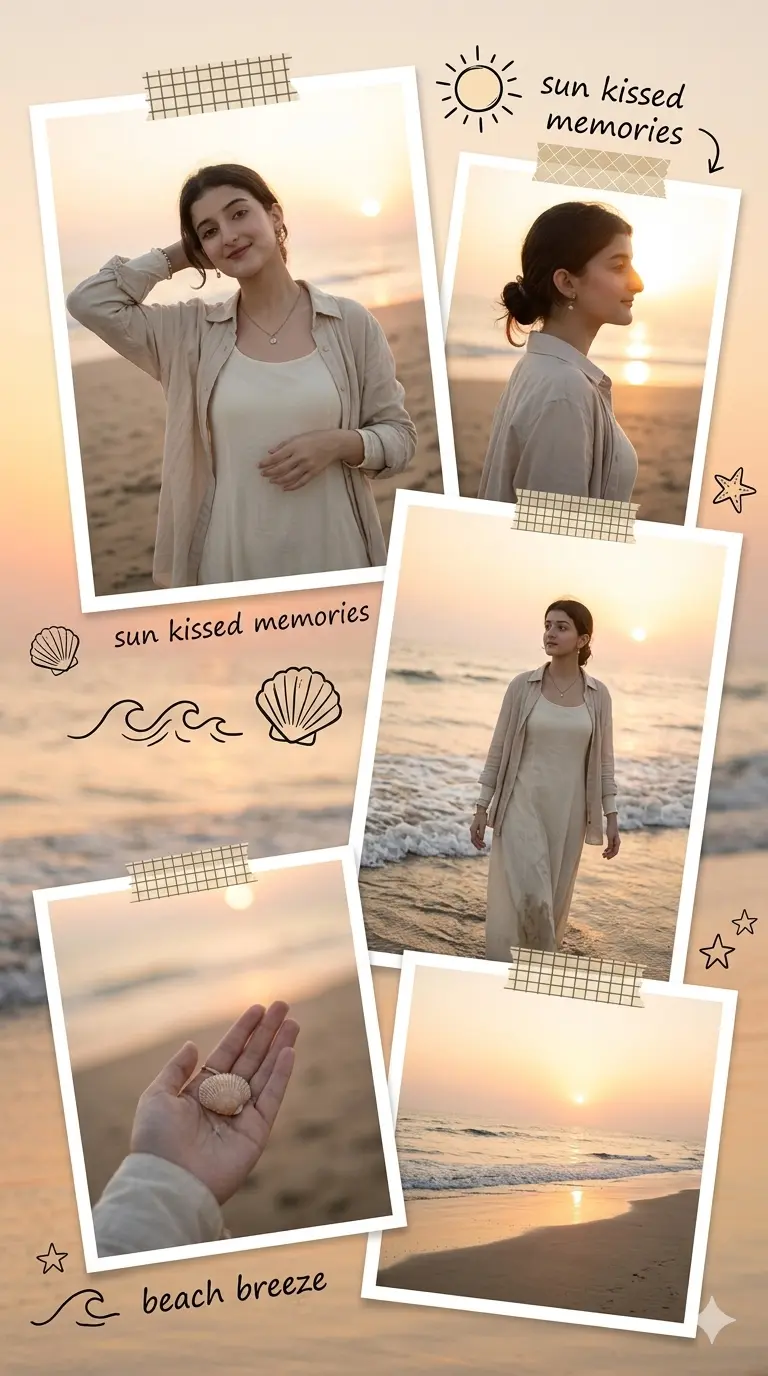
Transform the uploaded girl portrait into a 9:16 taped scrapbook beach collage, preserving exact identity, hairstyle, skin tone, expression, and realistic human details.
Use uploaded image only as identity reference.
Outfit Consistency:
Same outfit in every frame:
Cream full-sleeve maxi dress, light beige overshirt, minimal jewelry.
Layout Style:
Create a soft scrapbook tape layout. Think of it as real printed photos taped down with soft edges.
5 photos taped casually, some slightly rotated and layered on top of each other
Soft beach sunset background
Small doodles of sun, shells, waves, and tiny stars
Small handwritten text captions like:“sun kissed memories”
“beach breeze”
Photo Content:
Main photo: Relaxed beach pose
Side profile photo: With soft light from the sunset
Walking shot: Near the waves, soft sunset in the background
Hand detail photo: Holding a shell or flower
Wide shot: Of the beach at sunset
Background:
Soft sunset beach colors with tape marks and realistic shadows on the photos.
Effects:
Taped photo edges
Film grain for a real scrapbook feel
Dreamy lighting with natural glow
Negative Controls:
No watermark
No logo
No distorted face or anatomy
No extra hands
No repeated cut-outs
Gemini AI Prompt
Beach Diary Page Layout — With Doodle + Caption Text
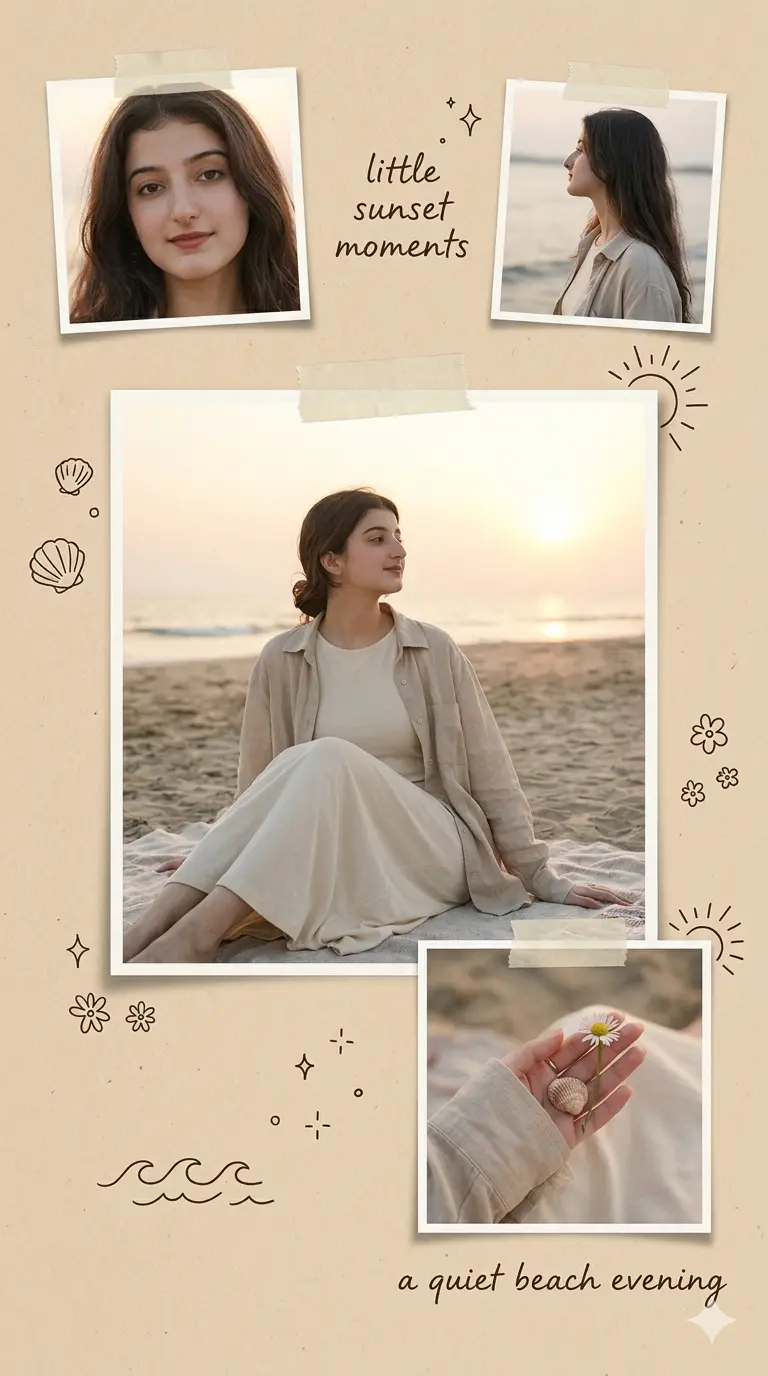
Transform the uploaded girl portrait into a 9:16 vertical beach diary page style collage, preserving exact facial identity, hairstyle, skin tone, expression, and realistic human details.
Use uploaded portrait only as identity reference.
Use one same outfit in every photo: soft cream long-sleeve dress, beige oversized linen shirt, minimal jewelry.
Create a simple diary layout:
1 large main photo in center
2 small photos taped near top (slightly tilted)
1 small detail photo at bottom
warm paper texture background
Add small doodles: shells, waves, flowers, sparkles, sun rays.
Add handwritten captions:
“a quiet beach evening”
“little sunset moments”
Photos:
Main: sitting calmly on beach blanket
Top: close-up + side profile
Bottom: hand holding flower/shell
Background: beige paper + soft sunset beach blur.
Effects: tape corners, soft shadows, film grain, cozy handmade feel.
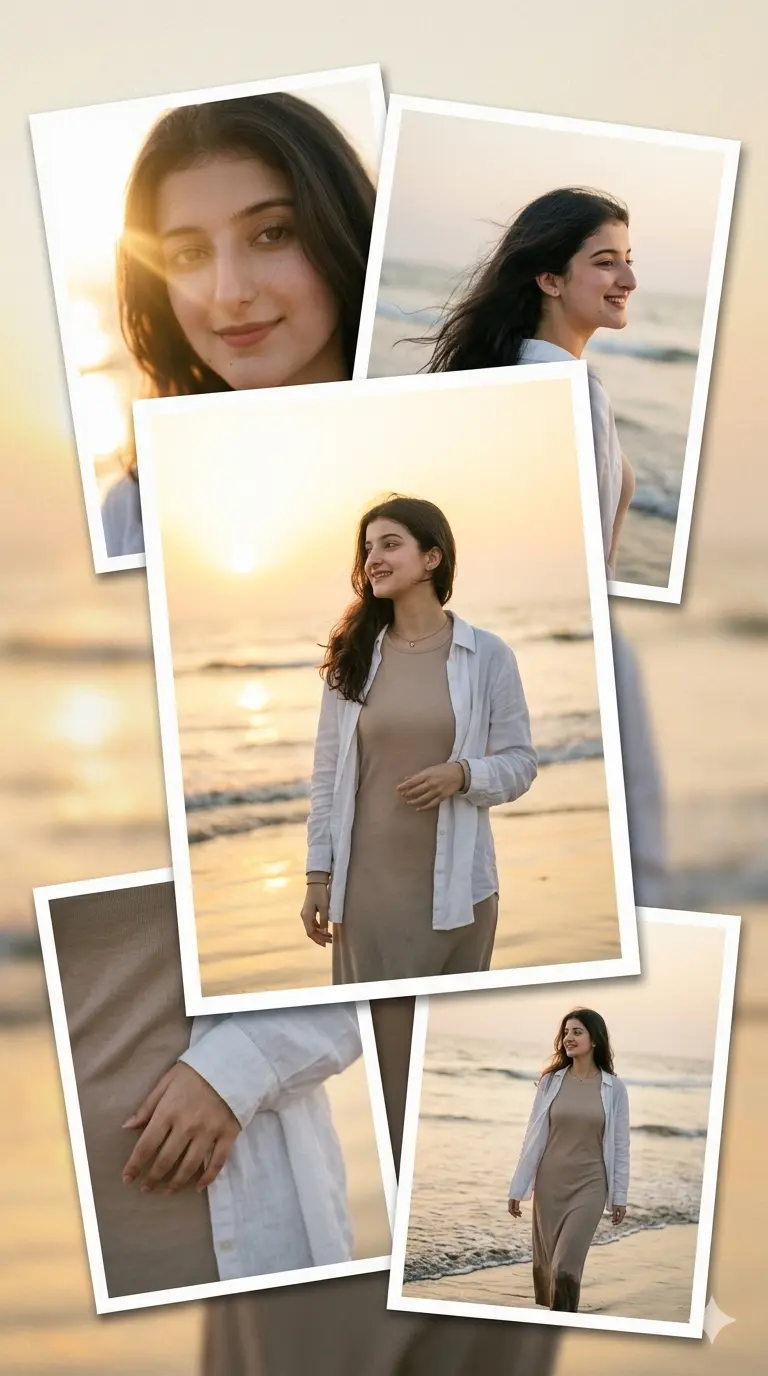
Transform the uploaded girl portrait into a 9:16 natural sunset beach photo stack collage, preserving exact facial identity, hairstyle, skin tone, expression, and realistic details.
Use uploaded portrait only as identity reference.
Outfit Consistency:
Same outfit in every frame:
Beige long-sleeve maxi dress with white linen overshirt and minimal jewelry.
Layout Style:
Create a simple, organic photo stack layout. Think of it like a real printed photo stack, not too organized or perfectly aligned, as if someone just placed the photos casually on a surface.
1 large center photo
2 photos behind it (slightly rotated)
2 small photos at the bottom corners
Soft beach sunset background
Photo Content:
Main photo: Relaxed beach pose with the girl gazing at the ocean
Behind left photo: Close-up with soft sunlight hitting her face
Behind right photo: Side profile with wind in her hair
Bottom left photo: Hand on the dress sleeve detail
Bottom right photo: Walking near the beach
Background:
Soft beige paper texture
Subtle ocean blur and golden sunset colors in the background
Effects:
Soft photo texture with slight film grain
Realistic printed look with shadows and gentle blur
Minimal aesthetic — keep it natural, like real photos!
Negative Controls:
No watermark
No logo
No distorted anatomy or face
No extra hands or body parts
Keep it simple and casual!
How to Use These Beach Collage Prompts in Gemini
Pick one clear, well-lit front-facing photo where your full face is visible, sunglasses or hats covering your face will confuse the identity lock in every frame
Choose one of the four prompts below based on the layout you want (floral frames, scrapbook tape, diary page, or photo stack) and paste it directly into Gemini along with your photo
If you want a specific handwritten caption instead of the default ones in the scrapbook or diary prompts, just edit the caption line inside the prompt before pasting
For the floral floating frame prompt, using a photo with your hair not fully covering your face gives Gemini a cleaner base for the side-angle and back-angle frames
Run the same prompt twice if the sunset lighting looks too orange or too flat on the first try, Gemini’s warm tone rendering can vary slightly between generations
The scrapbook tape and diary page prompts render the handwritten captions more reliably when your uploaded photo has a plain or softly blurred background, busy backgrounds sometimes bleed into the doodle placement
Across all four prompts, the outfit held up consistently frame to frame, but the small jewelry detail (bracelet or ring) occasionally got dropped in far-away frames like the wide shot or walking shot, worth a quick regenerate if you want it visible everywhere
The photo stack layout gives the most natural, least “edited” look of the four, good pick if you want something that reads as real phone photos rather than a designed collage
Frequently Asked Questions
Why does the floral floating frame layout sometimes merge two of the side frames together?
This happens when the uploaded portrait doesn’t have enough space around the face for Gemini to generate a separate side-angle frame. Cropping your original photo to include a bit more shoulder and background room before uploading usually fixes it.
Can I change the handwritten caption text in the scrapbook or diary prompt?
Yes, just replace the caption line in quotes with your own short phrase before pasting the prompt into Gemini. Keep it short, three to four words works best since longer text tends to distort in the doodle style.
Will the beach background match a specific real location?
No, these prompts generate a generic soft sunset beach with blurred ocean and sand tones rather than a real, identifiable location. If you want a specific beach look, you’d need to add that detail manually into the background section of the prompt.
Final Thoughts
These four aesthetic beach collage prompts give you a full range of styles, from a romantic floral layout to a casual scrapbook feel, without ever losing your face or outfit consistency between frames. Pick whichever layout matches your vibe, upload one clear photo, and paste the prompt straight into Gemini to see it come together. If you try any of these, we’d genuinely love to see the result, tag us on Instagram @image_promptlab so we can share it. Play around with the captions and details a little too, small tweaks like these make the final collage feel more like you. Save this post if you’re planning a full beach-themed photo set, all four prompts work well together as one cohesive series.