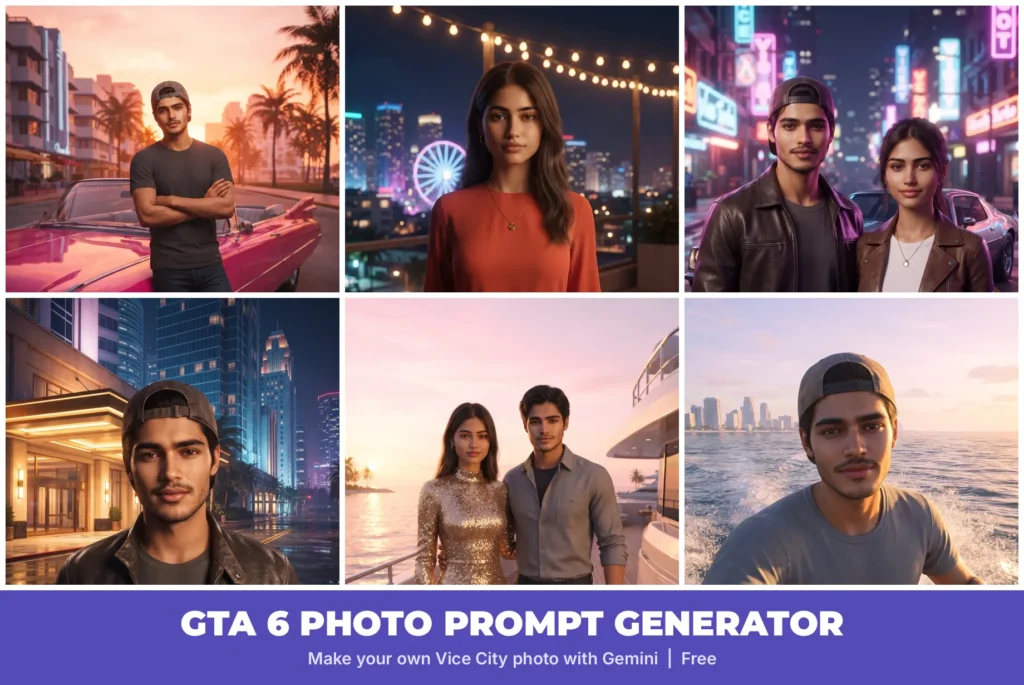
GTA 6 style photos are everywhere right now, and for good reason. GTA 6 launched on 19 November 2026, and fans want their own photos in that Vice City style. The good news is you do not need a game console or any editing skill. You only need your photo, Gemini, and the right prompt.
In this guide you will learn how to make GTA 6 style photos step by step, with your face staying 100% the same. You will also find the release date, the platforms, the price, and the story of GTA 6, so you know the game behind the look.
When Did GTA 6 Come Out?
GTA 6 launched on Thursday, 19 November 2026. It is available on PlayStation 5 and Xbox Series X and S only. There is no PC version announced yet.
The standard edition costs $79.99. Pre-load started on 10 to 12 November 2026, so players who pre-ordered could download the game before launch. The game was delayed twice on its way here: first from Fall 2025 to 26 May 2026, and then to 19 November 2026.
What Is GTA 6 About?
GTA 6 is set in Vice City, in the state of Leonida. Vice City is Rockstar’s version of Miami, Florida, with neon streets, palm trees, beaches and a bright ocean skyline. Leonida is the wider state around it, so the map goes beyond one city.
The story follows two main characters, Lucia and Jason, a couple whose lives get pulled into crime in Vice City. Lucia is the first female lead character in a main GTA game. The trailers show their life together: beach days, neon nights, car chases and the Vice City skyline behind them.
Make Your Own GTA 6 Style Photo
You do not need the game to get a GTA 6 photo of yourself. Our free GTA 6 Style Prompt Generator builds the prompt for you. Pick who is in the photo, pick a style like Vice City Neon Night or GTA Loading Screen Poster, pick an outfit and an expression, and click Generate Prompt. Then copy the prompt, open Gemini, add your photo, paste it, and send it.
Every prompt the tool builds tells Gemini to keep your face 100% the same as the reference photo. Only the style and the background change. The tool is 100% free, with no signup and no watermark, and it works on your phone too.
Here is what a prompt from the tool looks like:
Want more styles? The GTA 6 Style Prompt Generator has 7 styles in total, including Ocean Drive Day and Night Drive, plus more outfits and photo framings to mix.
Get 14 Ready-Made Prompts
If you want prompts you can copy and paste right away, we made a full collection for you. It has 14 tested prompts: neon nights, loading screen posters, beach sunsets, rooftop lights, night drives and more. Every prompt keeps your face 100% the same as your photo.
See the full list here: GTA 6 style photo prompts.
Pick the Right Photo First
Your photo decides the result more than the prompt does. Use a clear front photo where your face is well lit and easy to see. Avoid blurry photos, side angles, sunglasses, and group photos. A daylight photo, or a photo from a bright room, works best.
How to Use a GTA 6 Prompt in Gemini
Using a prompt is simple. Follow these steps:
Step 1: Open Gemini and start a new chat.
Step 2: Add your photo. Pick a clear front photo where your face is well lit.
Step 3: Paste the prompt and send it.
Step 4: Gemini returns your photo in GTA 6 style. If you like it, save it. If not, change one thing in the prompt, like the style or the outfit, and try again.
Step 5: If Gemini changes your face, try again with a clearer photo, or add this line at the end of your prompt: keep the face exactly the same as the reference photo.
If the first result is not right, change only one thing and try again: the style, the outfit, or the background. Changing one thing at a time shows you what made the result better.
Tips for the Best GTA 6 Photo
A clear front photo gives the best result, because Gemini can see your face properly. Good light matters too, so use a photo taken in daylight or in a bright room. If you like a result, change only one option next time, so you know what made it better. And if you want to show the change, put your normal photo and your GTA 6 photo side by side with our free before after collage maker. For more prompt ideas, browse the Gemini AI prompt generator and the full prompt collection. When a prompt gives you a photo you like, save that prompt, so you can use it again with another photo.
FAQs
When did GTA 6 release?
GTA 6 launched on 19 November 2026 for PlayStation 5 and Xbox Series X and S.
What platforms is GTA 6 on?
PlayStation 5 and Xbox Series X and S at launch. No PC version has been announced yet.
How much does GTA 6 cost?
The standard edition costs $79.99.
Who are the main characters in GTA 6?
Lucia and Jason, a couple living in Vice City, in the state of Leonida.
Will Gemini change my face in a GTA 6 photo?
No. Every prompt from our generator says to keep your face 100% the same as the reference photo, and only the style and background change.
Where can I find ready-made GTA 6 prompts?
See our GTA 6 style photo prompts collection: 14 tested prompts you can copy and paste into Gemini.
Is the GTA 6 Style Prompt Generator free?
Yes. It is 100% free, with no signup, no watermark and no limit on how many prompts you make.
Conclusion
GTA 6 is out now: 19 November 2026, Vice City, Lucia and Jason. Make your own GTA 6 style photo today with our free GTA 6 Style Prompt Generator, and share it with your friends.