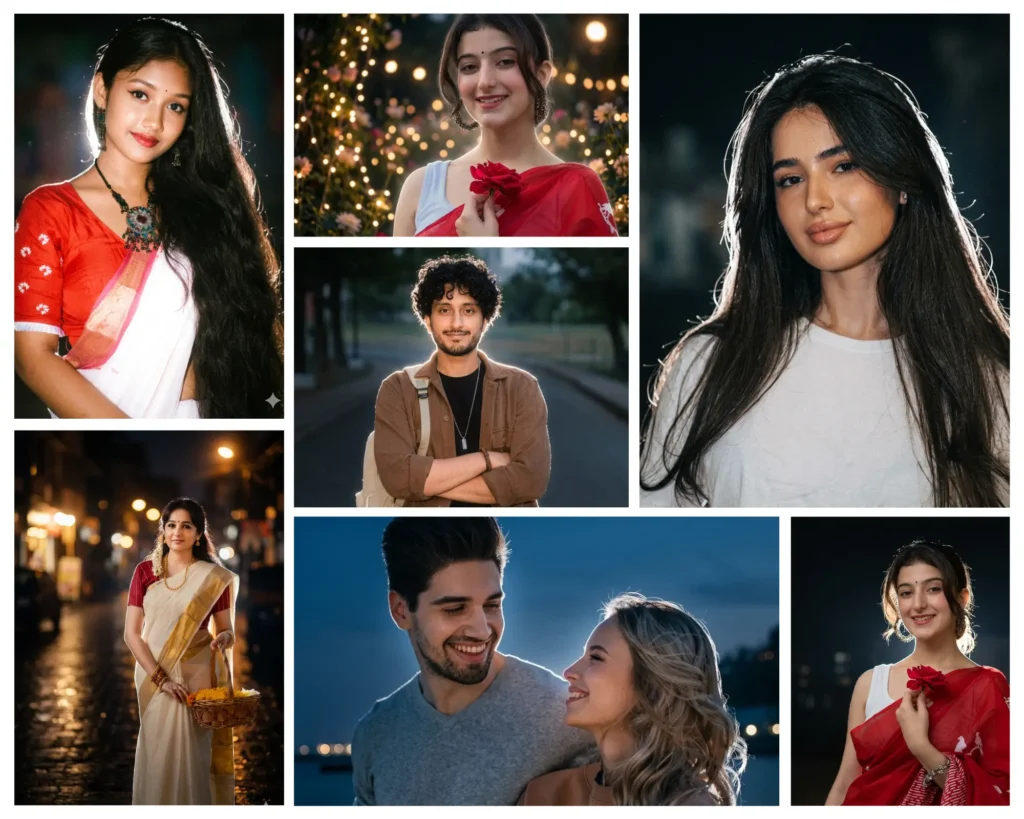
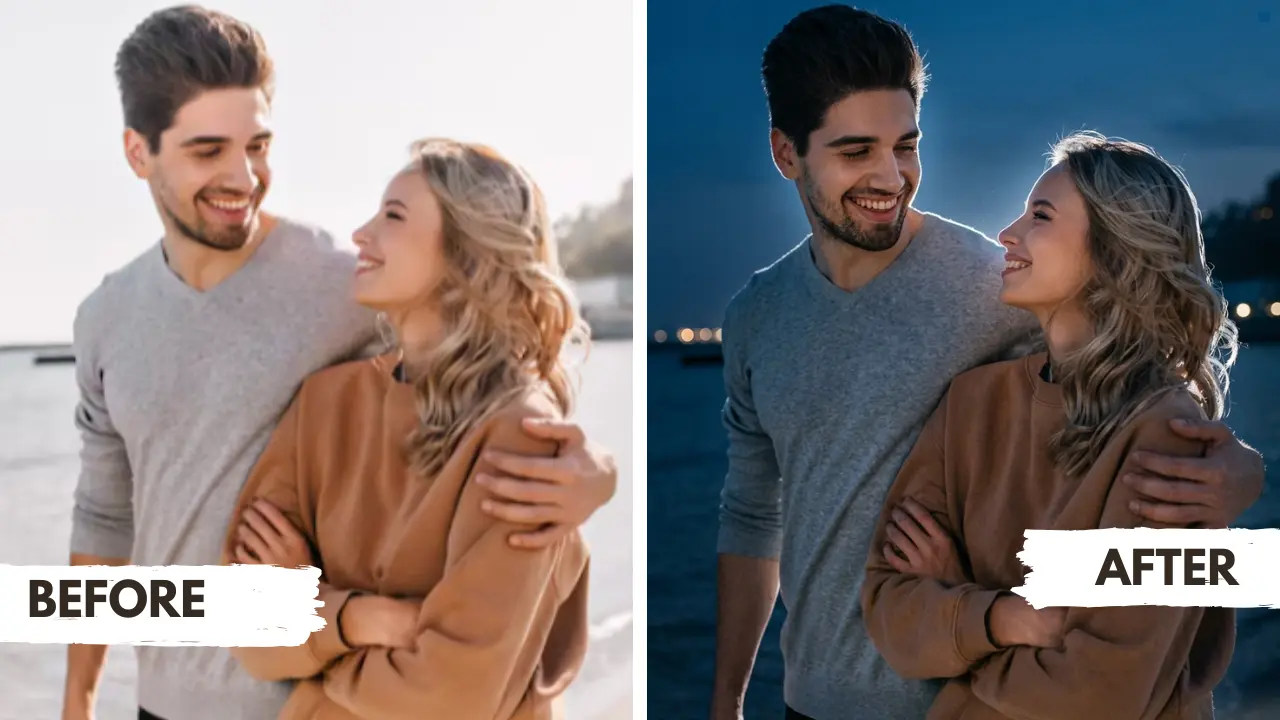
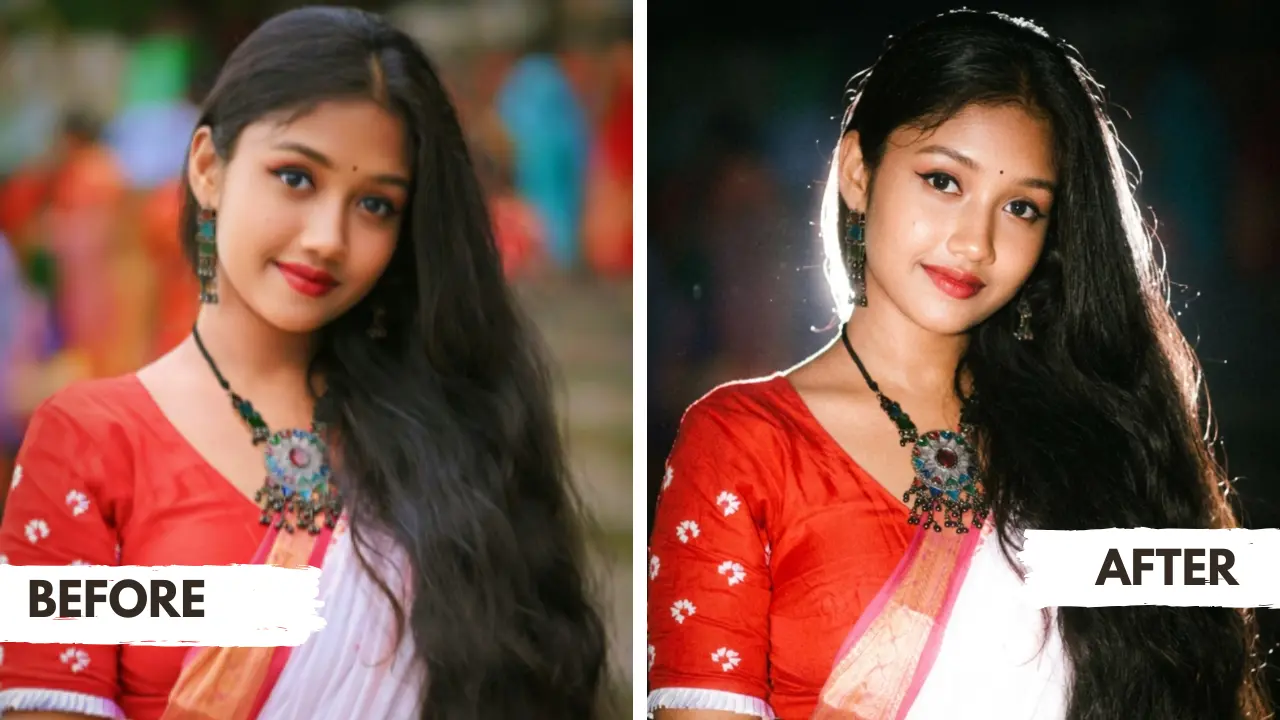
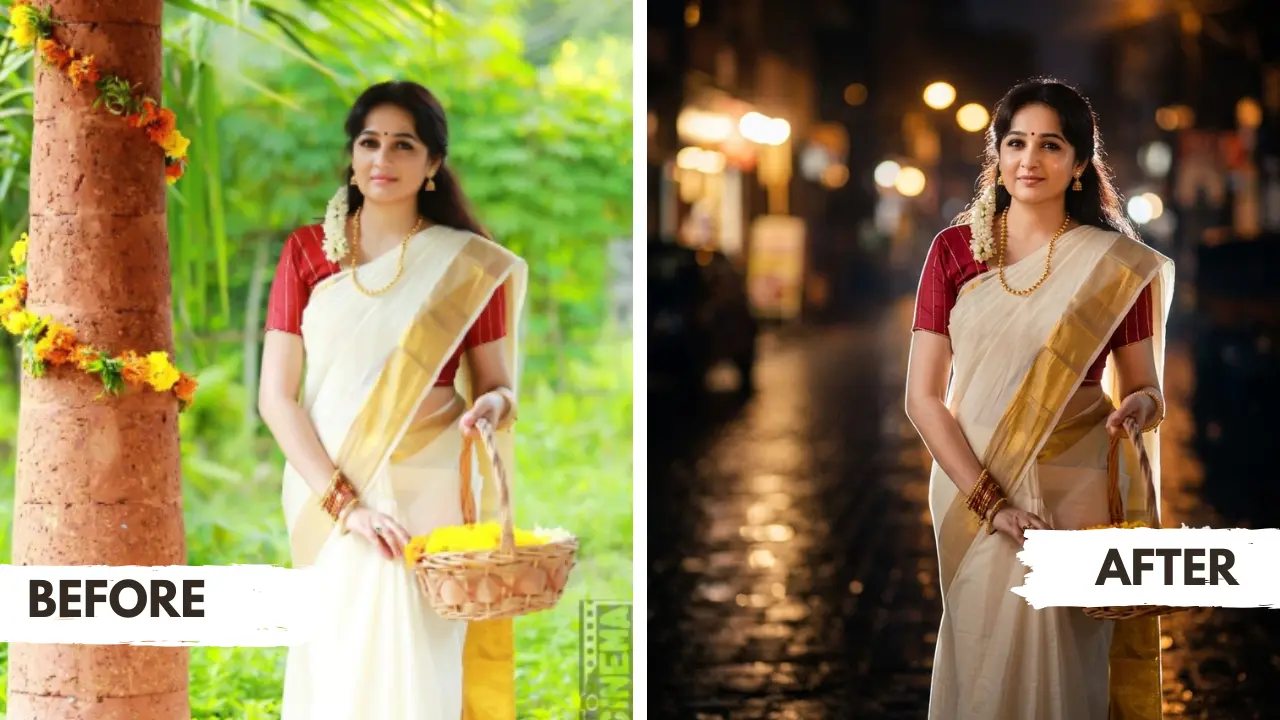
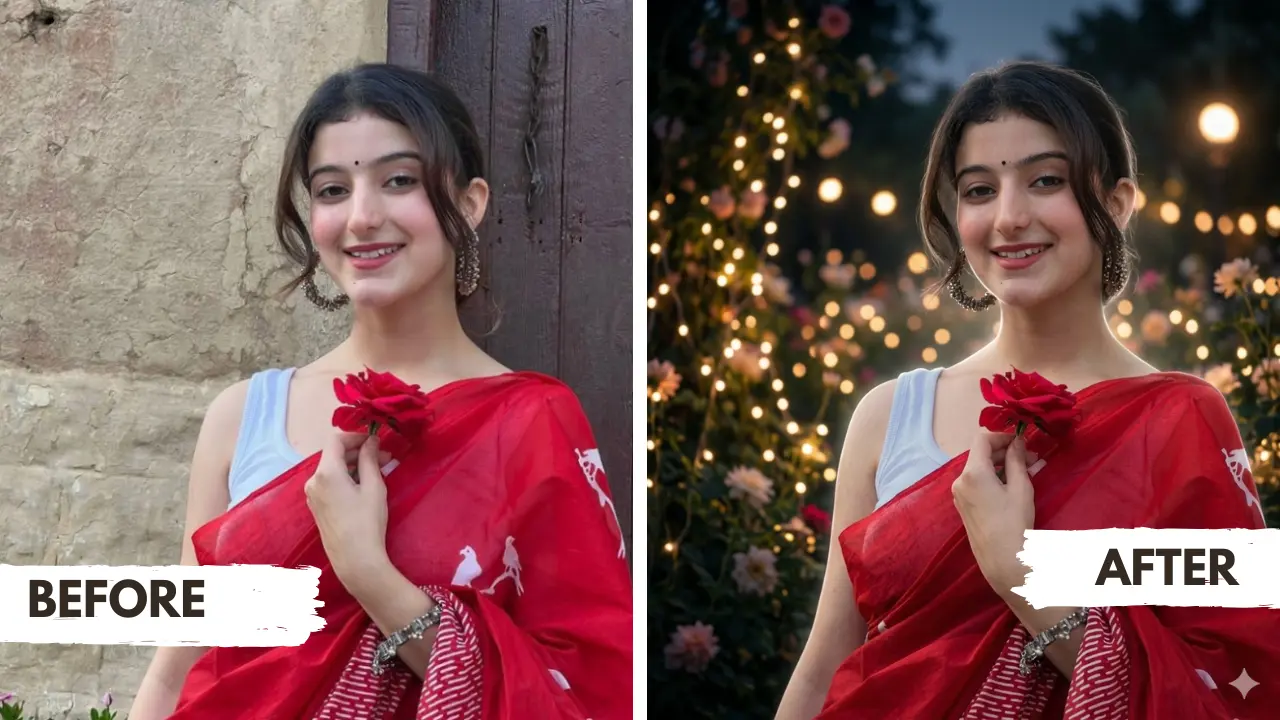
💡 How to Get the Lofi Dusk Backlight & Night Glow Effect in Gemini AI
Upload a clear photo to Google Gemini or ChatGPT, pick one of the 7 aesthetic dusk styles below (Signature Dusk, High-Fashion, White Backlight Aura, Blue Hour, Y2K Dark Flash, Golden Bokeh, or Fairy Lights), and use the core rule:
“Create a dark moody nighttime atmosphere with a powerful glowing backlight directly behind the subject, intense white rim light aura, CCD camera flash aesthetic, and soft bokeh glow while preserving exact facial identity.”
The night glow portrait look is taking over Instagram, and you can recreate it with just one prompt
You have seen them everywhere: that moody, cinematic portrait with a glowing white rim around the hair, a dark dreamy background, and just enough front flash to make the face pop. That is the Lofi Dusk Filter look, and right now it is one of the most searched Gemini AI photo editing styles on the internet. These trending Instagram filter prompts are not vague or generic. Each one is written to preserve your real face, your actual outfit, and your natural expression while wrapping the entire photo in that sought-after night glow aesthetic. Whether you are editing your own photo or creating portraits for others, this collection of Gemini AI prompts gives you a complete toolkit.
Gemini AI Prompt
Lofi Dusk Prompt Gemini Portrait
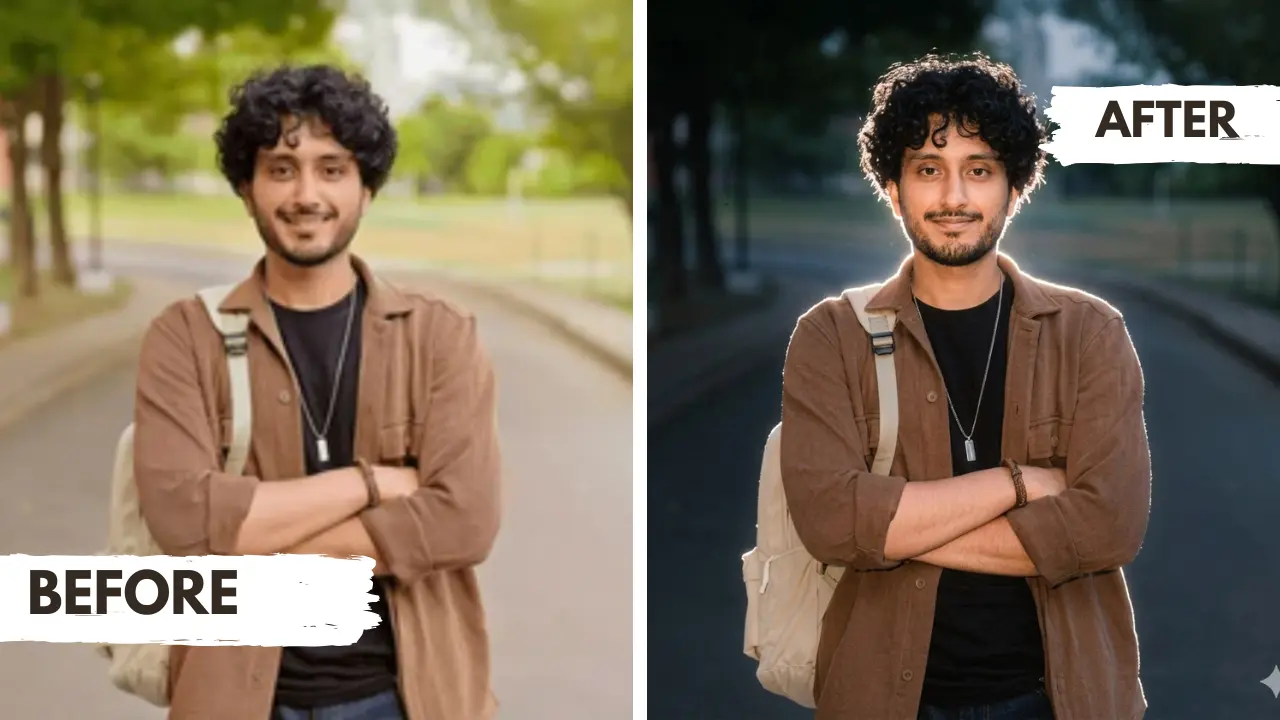
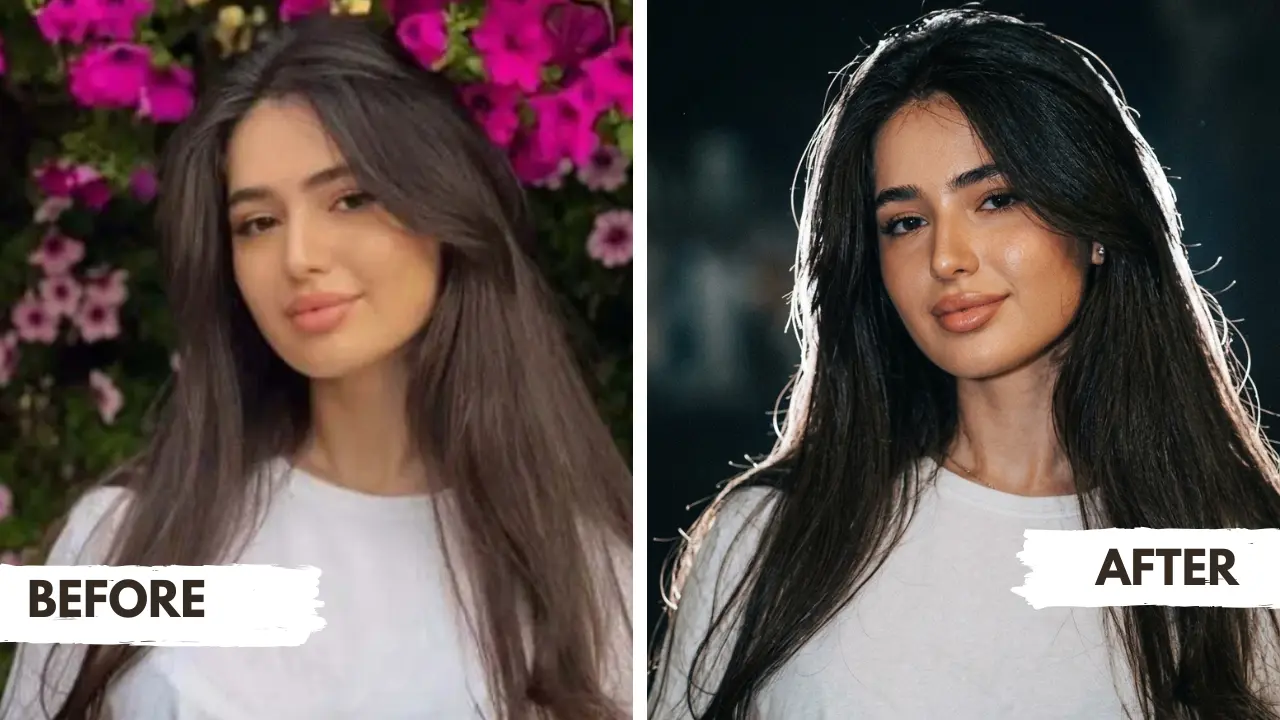
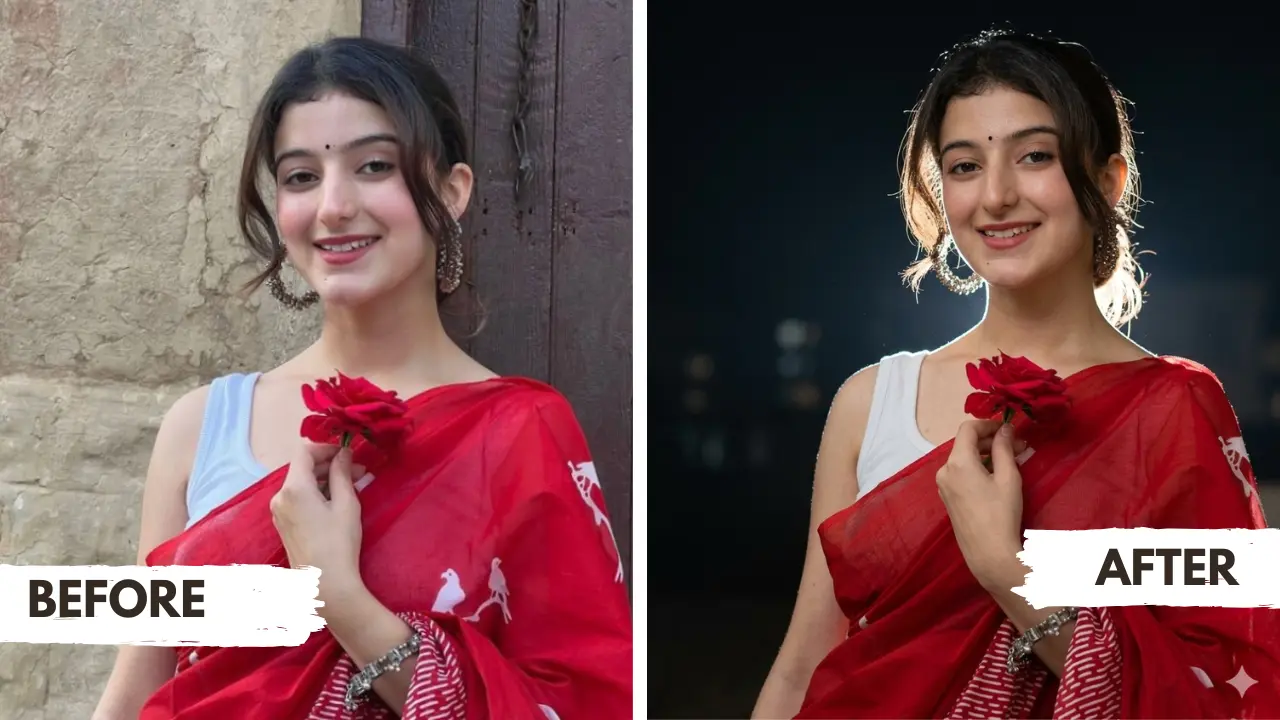
Transform the uploaded photo into a realistic Signature Lofi Dusk Glow portrait. Keep the subject’s exact face, natural expression, hairstyle, outfit, pose, body shape, and identity unchanged. Do not reshape the face, do not change the facial structure, and keep the person fully recognizable.
Create a dark muted dusk/night background with faded black tones, soft shadows, and a dreamy low-light atmosphere. Add a strong white backlight behind the subject, creating a glowing rim around the hair, shoulders, arms, clothing edges, and full body outline. The glow should look like real camera light, not neon or fantasy.
Use a direct but soft front flash to make the face and outfit visible, with warm peachy skin highlights, realistic skin texture, slight flash brightness, and natural shadows. Add soft bloom, gentle halation, mild haze, fine film grain, low-light CCD sensor noise, faded blacks, muted colors, shallow depth of field, and a nostalgic Instagram Y2K night-photo look. The final image should feel raw, aesthetic, cinematic, viral, and realistic like a real Lofi Dusk filter portrait.
Negative prompt: Avoid changing the face, different identity, face reshaping, changed eyes, changed nose, changed lips, fake beauty filter, over-smoothed skin, plastic skin, cartoon style, anime style, neon glow, fantasy aura, excessive brightness, extreme darkness, washed-out face, blurry face, distorted hands, extra fingers, missing fingers, bad anatomy, unrealistic body shape, oversaturated colors, fake background, watermark, text, logo, duplicate subject, low-quality details.
Gemini AI Prompt
High-Fashion Night Flash Editorial
Transform the uploaded photo into a High-Fashion Night Flash Editorial portrait. Preserve the subject’s original face, identity, hairstyle, outfit, expression, pose, and body proportions exactly. Keep all facial features realistic and unchanged.
Use a clean near-black background with soft depth, muted tones, and subtle atmospheric blur. Add a dramatic white backlight behind the subject to create refined rim lighting around the hair, shoulders, arms, clothing edges, and full body outline. The light should look polished but still realistic, like a fashion shoot captured at night.
Add direct flash illumination from the front to make the face and outfit visible, sharp, and stylish. Keep warm peach skin tones, realistic skin texture, soft highlights, deep shadows, slight shine on clothing, subtle bloom, lens diffusion, faded blacks, fine film grain, low-light digital camera texture, and cinematic contrast. The final image should look expensive, moody, sharp, Instagram-worthy, and ultra-realistic.
Negative prompt: Avoid altered face, different person, face reshaping, fake beauty filter, plastic skin, over-smoothed texture, overly bright studio look, flat lighting, neon aura, fantasy glow, cartoon style, anime style, distorted facial features, bad anatomy, extra fingers, missing fingers, watermark, text, logo, oversaturated colors.
Gemini AI Prompt
Pure White Backlight Aura
Edit the uploaded photo into a photorealistic night portrait with a clean white backlight aura. Preserve the same face, expression, hairstyle, outfit, pose, skin tone, body proportions, and identity exactly. The subject must look like the same real person with no facial changes.
Make the background deep, dark, and softly blurred, fading into muted black shadows with only faint night details visible. Place a bright white light directly behind the subject to create a powerful rim glow around the hair, shoulders, arms, outfit borders, hands, and body outline. The rim light should look strong but realistic, like a flash or spotlight coming from behind.
Add subtle front flash to reveal the face naturally while keeping the image moody and low-light. Use warm peachy highlights on the skin, realistic skin texture, gentle shadow depth, soft bloom around bright edges, slight halation, faded blacks, fine grain, low-light camera noise, and shallow depth of field. The final look should feel like a viral Instagram night flash portrait with a glowing white outline and cinematic dusk mood.
Negative prompt: Avoid face alteration, different person, changed facial features, heavy retouching, plastic skin, unrealistic glow, neon outline, fantasy effect, overexposed face, too much darkness, blurry eyes, distorted facial details, bad hands, extra fingers, missing fingers, cartoon look, anime look, oversaturated colors, watermark, text, logo, fake background, duplicate person.
Gemini AI Prompt
Deep Blue Hour Flash Mood
Turn the uploaded image into a cinematic Deep Blue Hour Flash portrait. Keep the subject’s real face, natural expression, hairstyle, outfit, pose, body shape, and identity unchanged. Do not modify the face or make the person look different.
Create a dark blue-hour background with deep navy shadows, cool muted tones, soft outdoor blur, and faint distant lights. Add a white-blue backlight behind the subject, forming a cool glowing rim around the hair, shoulders, arms, clothing edges, and body silhouette. The background should feel like early night after sunset, calm, dark, and aesthetic.
Use a soft front flash to keep the face sharp and naturally visible. Balance cool blue shadows with warm peachy skin highlights so the subject does not look pale. Add subtle lens flare, soft bloom, gentle haze, faded black tones, low-light sensor noise, fine film grain, shallow depth of field, and realistic DSLR night photography texture. The final image should look like a premium Instagram blue-hour Lofi Dusk edit.
Negative prompt: Avoid changed face, different identity, face reshaping, unnatural eyes, altered lips, fake skin, plastic texture, too much blue saturation, neon blue glow, fantasy lighting, washed-out face, harsh overexposure, extreme darkness, blurry face, bad anatomy, distorted body, extra fingers, missing fingers, watermark, text, logo, low-quality result.
Gemini AI Prompt
Viral Dark Flash Camera Look
Apply a viral dark flash camera effect to the uploaded photo. Preserve the exact same face, identity, expression, hairstyle, outfit, pose, and natural body proportions. The face must remain realistic, recognizable, and unchanged.
Make the image look like a candid photo taken at night with a strong phone flash or compact digital camera flash. Keep the background very dark, blurry, underexposed, and fading into black. The subject should be clearly lit by direct front flash, with slightly overexposed highlights on bright clothing, skin, and accessories.
Add a powerful white backlight behind the subject to create a glowing outline around the hair, shoulders, arms, outfit edges, legs, and full body shape. Include harsh flash contrast, soft bloom diffusion, gentle halation, light bleeding near bright areas, warm peach skin tones, faded blacks, grainy CCD texture, low-light noise, slight haze, and nostalgic Y2K disposable camera mood. The final image should look raw, viral, stylish, realistic, and Instagram-ready.
Negative prompt: Avoid changing identity, face distortion, altered facial structure, fake beauty filter, overly smooth skin, plastic skin, professional studio lighting, soft luxury editorial look, bright background, neon glow, fantasy aura, cartoon style, anime style, bad hands, extra fingers, missing fingers, distorted body, watermark, text, logo, oversaturated colors.
Gemini AI Prompt
Golden Streetlight Cinema Portrait
Create a warm Golden Streetlight Cinema portrait from the uploaded image. Keep the subject’s same face, natural expression, hairstyle, outfit, pose, body shape, and identity unchanged. Do not alter facial features, do not reshape the face, and keep the person fully recognizable.
Build a dark street-style background with warm golden bokeh lights, amber streetlight reflections, deep shadows, and a romantic evening atmosphere. Add a clean white rim glow behind the subject, softly outlining the hair, shoulders, arms, clothing edges, and body silhouette. Let the warm background lights blend naturally with the white rim glow.
Use a gentle front flash to keep the face clear and realistic, with warm peachy skin highlights, soft cheek glow, natural skin texture, and balanced exposure. Add cinematic shadows, subtle bloom around golden lights, mild haze, fine film grain, faded blacks, low-light camera noise, shallow depth of field, and an emotional Instagram dusk-filter look. The final image should feel romantic, cinematic, premium, and realistic.
Negative prompt: Avoid face changes, different identity, fake smile, changed eyes, changed lips, plastic skin, over-smoothed face, harsh yellow oversaturation, fake golden glow, excessive brightness, extreme darkness, blurry face, bad hands, extra fingers, missing fingers, cartoon effect, anime style, watermark, text, logo, low quality.
Gemini AI Prompt
Fairy Light Garden Dusk Dream
Transform the uploaded photo into a Fairy Light Garden Dusk Dream portrait. Preserve the exact same face, identity, expression, hairstyle, outfit, pose, skin tone, and body shape. The subject must remain fully recognizable with natural facial details unchanged.
Create a dark floral or garden-style background with soft fairy lights, warm glowing bokeh, faint flowers, and a dreamy evening atmosphere. Add a white rim light behind the subject, gently outlining the hair, shoulders, arms, outfit edges, and body silhouette. The glow should look like real light passing through fairy lights and background lamps, not an artificial neon effect.
Use soft front flash lighting to reveal the face clearly with warm peachy highlights, realistic skin texture, gentle shadows, and natural low-light contrast. Add cinematic haze, soft bloom around fairy lights, slight halation, faded black tones, fine film grain, low-light CCD noise, shallow depth of field, and nostalgic Instagram dusk-photo texture. The final image should look romantic, emotional, dreamy, realistic, and viral.
Negative prompt: Avoid face changes, different identity, face distortion, fake beauty filter, plastic skin, over-smoothed face, neon fairy lights, fantasy aura, cartoon style, anime style, excessive fog, too much brightness, extreme darkness, blurry face, bad hands, extra fingers, missing fingers, fake background, watermark, text, logo.
Related prompts you might also like
If you enjoyed these night glow prompts, here are some other styles you might love:
And if you love bold, playful creativity, the Viral Gemini AI Doodle Photo Prompt turns any image into charming hand-drawn doodle art that stands out in any feed.
Frequently asked questions
Can girls, boys, and couples all use these Lofi Dusk Filter prompts?
Absolutely yes. Every prompt in this collection works for any gender and any number of people in the photo. If you are a girl uploading a solo selfie, a boy uploading a casual portrait, or a couple uploading a photo together, the prompt will apply the same Lofi Dusk night glow effect while keeping every person in the frame looking exactly like themselves. Just upload your photo and paste the prompt as written — no changes needed.
How do I use the Lofi Dusk Glow Effect prompt in Gemini AI, step by step?
Open Google Gemini at gemini.google.com on your phone or browser and sign in to your Google account. Tap the image upload icon and select a clear, well-lit photo of yourself, your partner, or your group. Copy the full prompt text from this page including the negative prompt section at the bottom. Paste it into the Gemini chat box alongside your uploaded photo and press enter. Wait about 15 to 30 seconds for the result to generate. If the face looks slightly different from the original, type “Regenerate but keep the face 100% identical to the uploaded photo” and submit again.
What makes the Pure White Backlight Aura prompt different from the other styles on this page?
The Pure White Backlight Aura focuses entirely on a single powerful rim light coming from directly behind the subject. Where other prompts in this collection layer warm golden tones, blue hour color grading, or fairy light bokeh into the background, this one keeps the background pure deep black with maximum contrast against the bright white rim glow. The result is the cleanest, most graphic looking portrait in the set, ideal for profile photos and Instagram highlights covers.
Which of these 7 prompts works best for an outdoor photo taken during the day?
The Golden Streetlight Cinema Portrait and the Fairy Light Garden Dusk Dream prompts handle daytime outdoor photos the best. Both are designed to completely replace the background with a dark atmospheric scene, so it does not matter what your original background looks like. A bright afternoon photo shot in a park or on a street will be transformed into a warm evening portrait with amber bokeh or soft fairy lights regardless of how much daylight was in the original.
Can I use the Viral Dark Flash Camera prompt to get that Y2K disposable camera look for group photos?
Yes, this prompt works really well for group shots because the dark flash camera style naturally frames multiple subjects under the same harsh front flash and glowing backlight. Upload a photo where all faces are clearly visible and not too far from the camera. The prompt will apply the grainy CCD texture, overexposed flash highlights, and dark background to the whole group while preserving each person’s identity. Group photos taken at arm’s length or with a wide angle work best for this style.
What is the difference between the High-Fashion Night Flash Editorial and the Viral Dark Flash Camera Look?
The High-Fashion Night Flash Editorial is polished, expensive, and controlled, the lighting is sharp and refined, the contrast is cinematic, and the overall mood feels like a luxury magazine shoot captured at night. The Viral Dark Flash Camera Look is rawer and grittier, it mimics a candid phone camera flash photo with blown-out highlights, heavy grain, CCD noise, and that unfiltered Y2K energy. If you want to look like you belong in a fashion campaign, go editorial. If you want to look like the photo was taken spontaneously at a night event, go dark flash.
Do I need to pay for Gemini to use these prompts, or does the free version work?
The free version of Google Gemini supports image uploads and image editing prompts, so you can use all seven prompts on this page without any paid subscription. Gemini Advanced may produce slightly more detailed results in some cases, but the free tier delivers strong, usable outputs for all the Lofi Dusk Filter styles shown here. Just make sure you are using a device with a stable internet connection since the image generation step requires a live connection to process.
Start creating your own night glow portraits today
This page gave you seven complete, ready-to-use Gemini AI prompts covering every major variation of the Lofi Dusk Filter aesthetic, from deep blue hour moods and golden streetlight cinema to fairy light garden dreams and viral dark flash looks. Each prompt is written to preserve your real face while delivering that cinematic night glow that performs so well on Instagram right now. Try your favorite style today, and if you want a prompt tailored to your specific outfit and pose, the free Custom Prompt Generator Tool is right here on this page. If your photo turns out exactly how you imagined, share it in the comments or tag us on Instagram, we would genuinely love to see what you create.