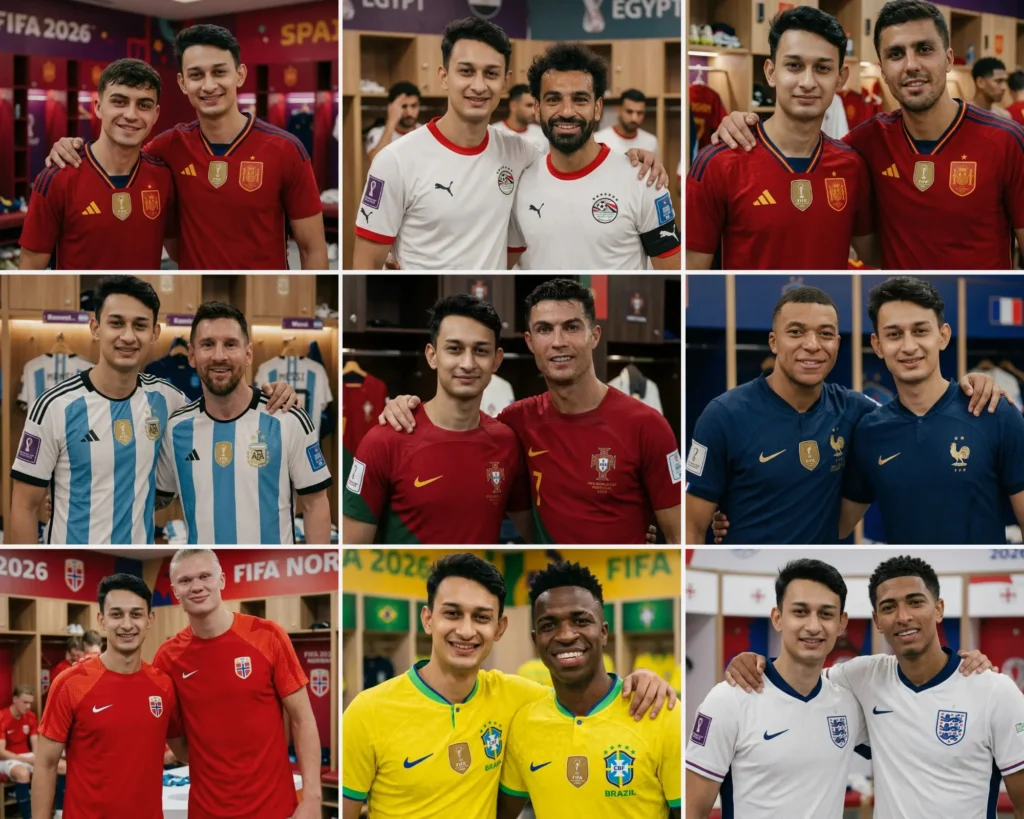
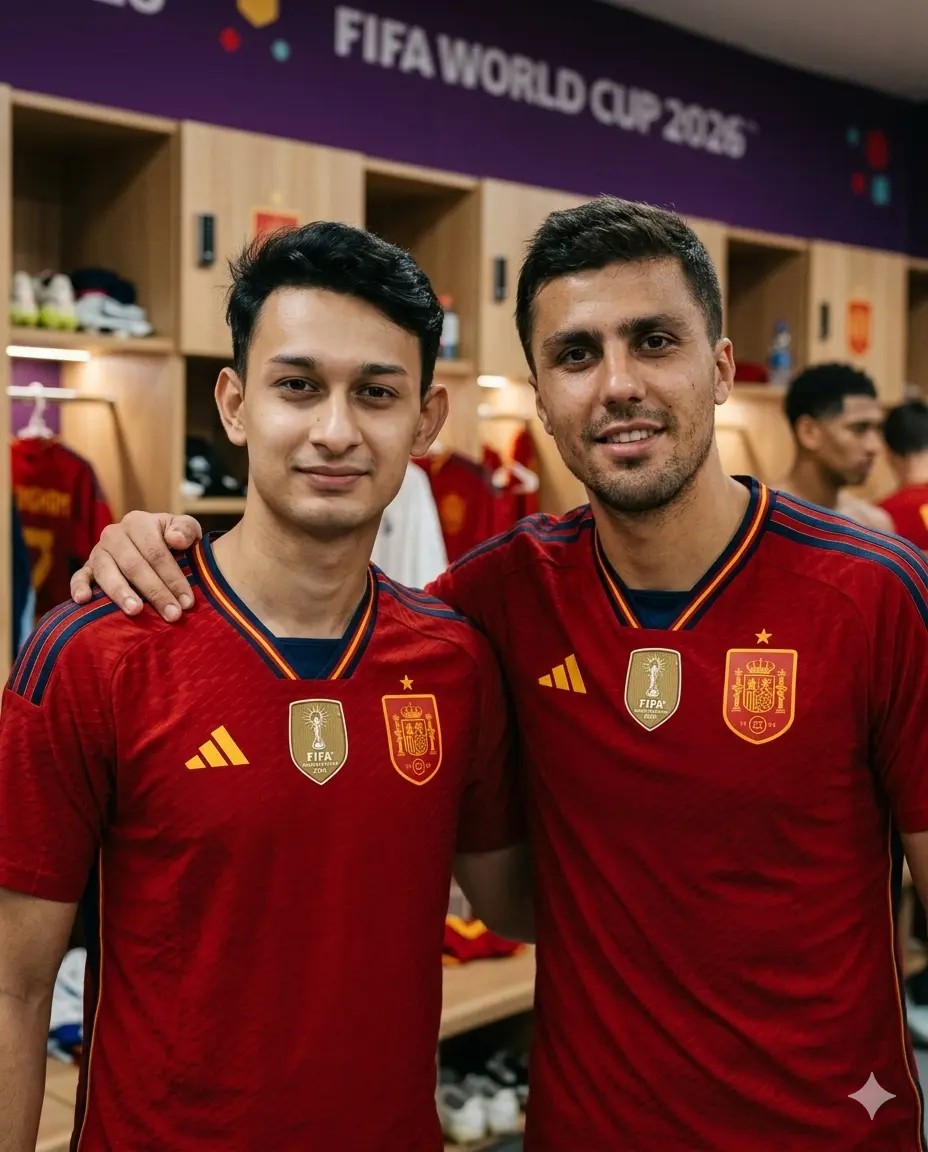
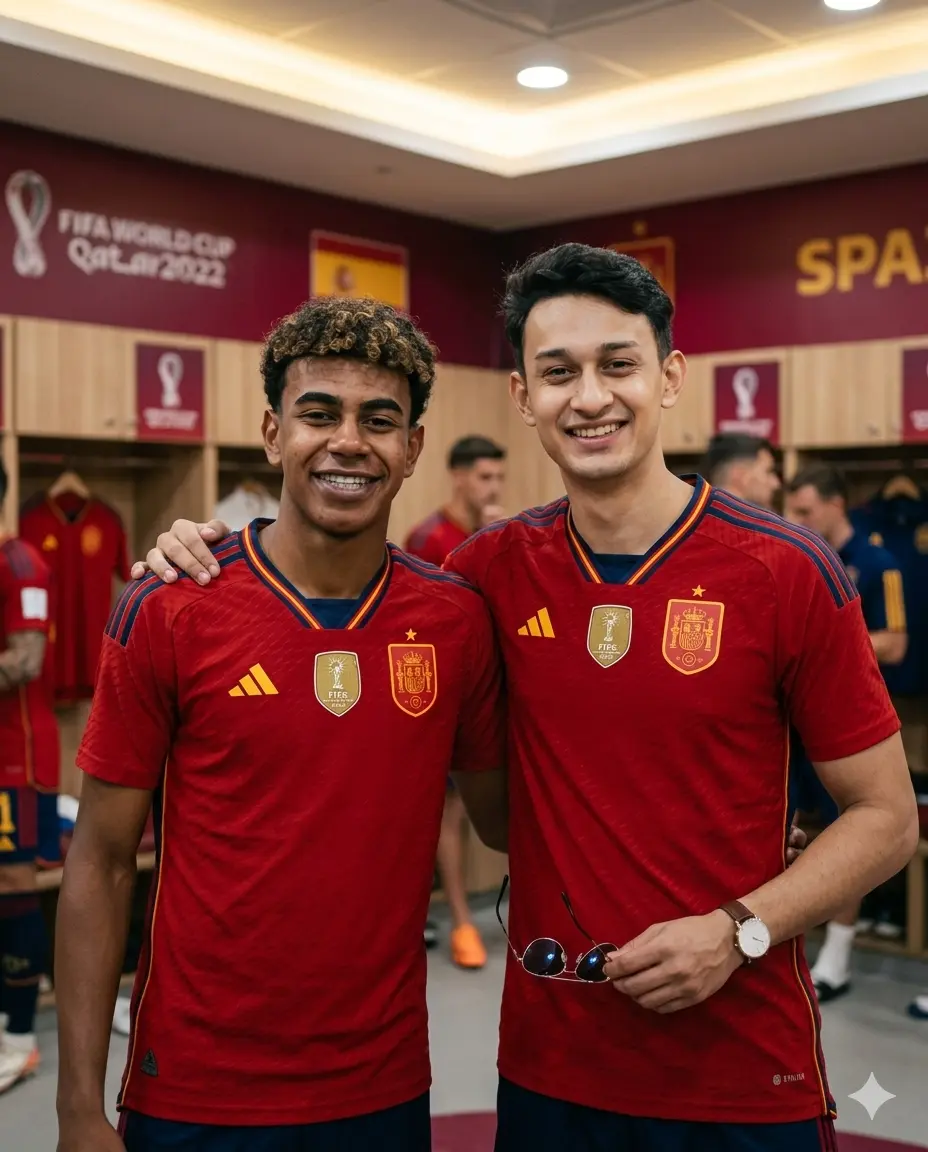
If you have ever wanted a photo standing beside Cristiano Ronaldo or Lionel Messi in a FIFA World Cup dressing room, these Gemini AI Boys FIFA 2026 prompts are built exactly for that. Each prompt is engineered to place your real face, your real skin tone, and your real identity next to one of ten world-class football stars, inside their national team dressing room, wearing the official 2026 World Cup jersey, in a candid photo that looks like it was taken by a teammate. No photographer needed. No Photoshop skills required. Just your photo, Gemini AI, and the right prompt. This page gives you all ten prompts ready to copy.
Use my uploaded photo as reference. Preserve the exact face, skin tone, facial features, and identity — no alterations. Do not change my face, do not replace me, do not generate a new person — I must appear exactly as I look in my uploaded photo.
IMAGE FORMAT: Portrait 4:5 vertical ratio — optimized for Instagram portrait post.
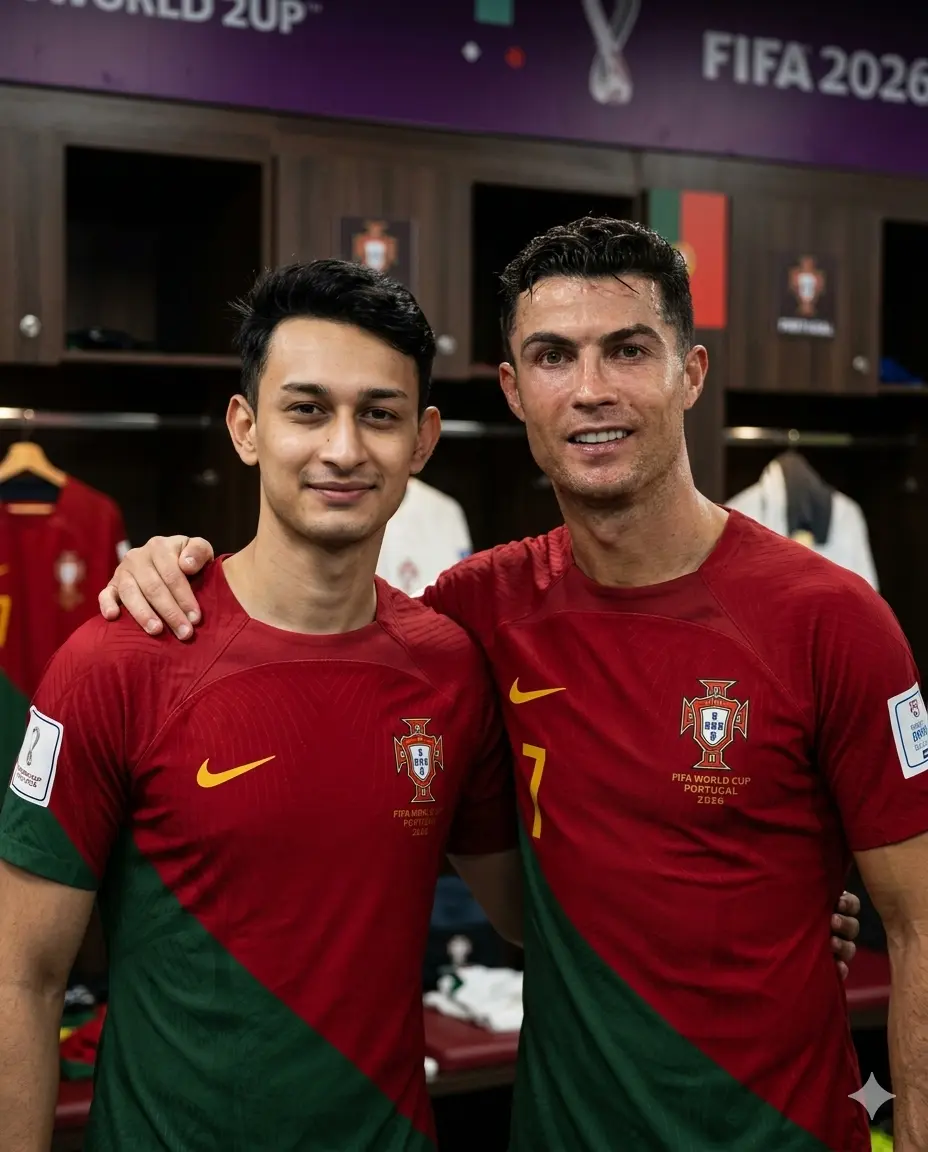
This is a NATURAL CANDID PHOTO — taken by a third person standing directly in front of us at eye level. NO PHONE IN FRAME. NO SELFIE ANGLE. I am standing naturally beside Cristiano Ronaldo inside the Portugal FIFA World Cup 2026 dressing room — arms casually around each other, both looking directly at camera at eye level, natural relaxed smiles — like a real photo taken by a teammate or team photographer.
Both wearing Portugal 2026 official jersey — deep crimson red, FPF badge on chest, FIFA World Cup 2026 patch on sleeve. Ronaldo post-match natural look — slightly disheveled hair, natural jaw, real post-game expression — relaxed and genuine.
Composition: portrait close-up — chest up, both faces equally in frame, straight eye level. No phone. No selfie angle. Both faces front facing, clearly visible. Natural comfortable body language between us.
Background: Portugal dressing room — dark wood cubicles, crimson red jerseys hanging blurred behind, FIFA 2026 Portugal branding softly out of focus. Warm indoor ambient lighting.
Skin rendering — CRITICAL: Ronaldo’s natural skin — real pores, post-match redness, authentic stubble texture, natural neck. My skin exactly as uploaded photo. No beauty filter, no smoothing, no plastic finish on any face.
Lighting: warm soft dressing room overhead lights — gentle ambient glow, no flash, no harsh shadows — real indoor photography feel.
Shot on Canon EOS R5, 50mm lens, f/1.8, ISO 1600. Natural grain. Both faces sharp. Background soft bokeh. Warm crimson-toned environment.
Mood: genuine quiet post-match moment — real candid dressing room photo — warm, natural, intimate.
Ultra realistic, 8K resolution, professional photography, sharp focus, masterpiece quality, human-taken feel — not AI generated.
Gemini AI Prompt
Photo with Lionel Messi in Argentina Dressing Room
Use my uploaded photo as reference. Preserve the exact face, skin tone, facial features, and identity — no alterations. Do not change my face, do not replace me, do not generate a new person — I must appear exactly as I look in my uploaded photo.
IMAGE FORMAT: Portrait 4:5 vertical ratio — optimized for Instagram portrait post.
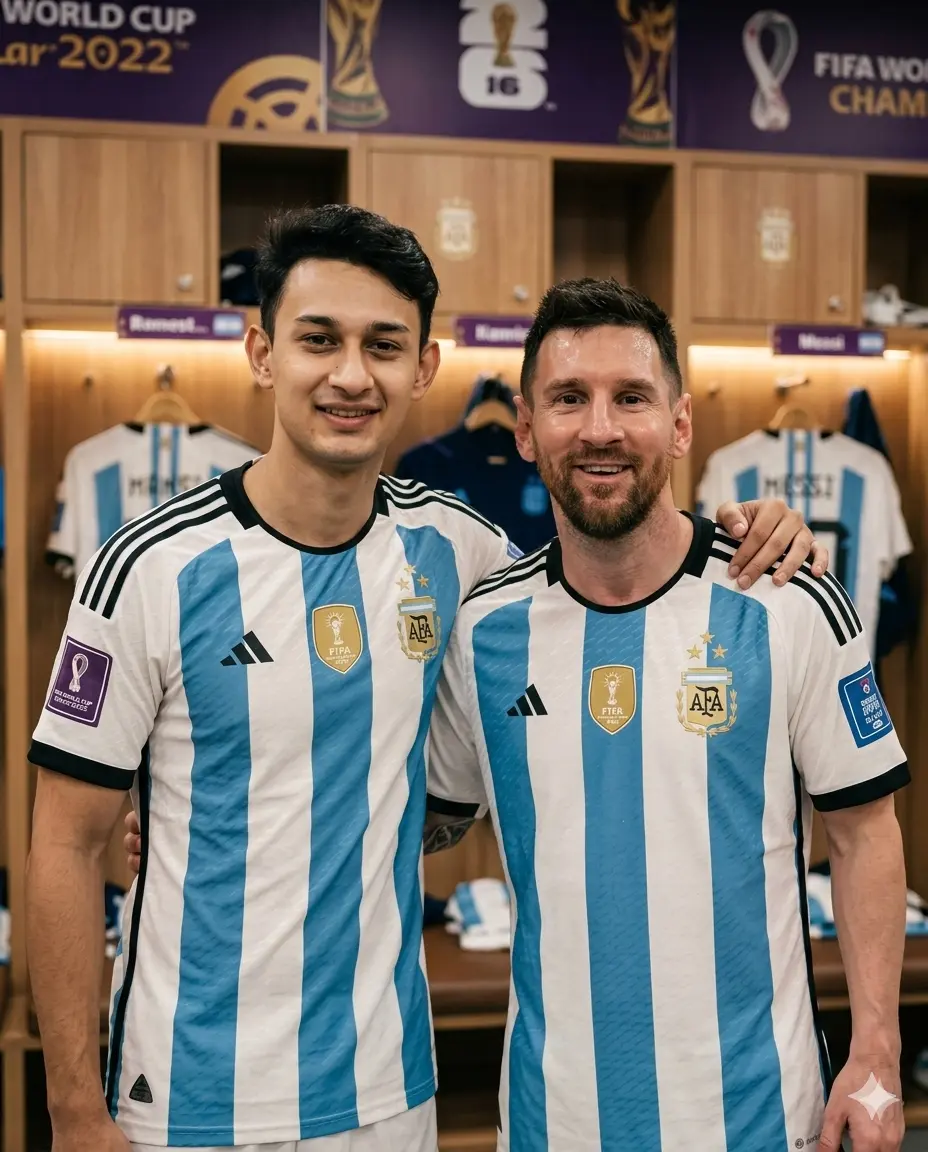
This is a NATURAL CANDID PHOTO — taken by a third person standing directly in front of us at eye level. NO PHONE IN FRAME. NO SELFIE ANGLE. I am standing naturally beside Lionel Messi inside the Argentina FIFA World Cup 2026 dressing room — arm casually around each other’s shoulders, both looking directly at camera, natural genuine smiles — the way a friend photographs two people together. Camera is at our eye level, straight on, both faces fully visible and front facing.
Both of us wearing Argentina 2026 official jersey — sky blue and white vertical stripes, AFA badge on chest, FIFA World Cup 2026 patch on sleeve. Messi post-match — hair slightly natural, slight sweat on forehead, real relaxed face — not groomed or styled.
Composition: portrait close-up — both figures from chest up, both faces equally prominent in frame. Straight eye-level shot. No upward angle. No phone visible anywhere. Natural body language — slight lean into each other, comfortable and relaxed.
Background: Argentina dressing room interior — wooden cubicles with name tags, sky blue and white jerseys hanging softly blurred behind us, FIFA 2026 championship banner on wall out of focus. Warm soft interior lighting throughout.
Skin rendering — CRITICAL: Real human skin on both faces — natural pores, slight post-match fatigue, Messi’s real beard stubble, natural skin unevenness, no beauty filter, no AI smoothing, no plastic finish. My skin identical to uploaded photo — same tone, same texture, zero changes.
Lighting: warm soft overhead dressing room lights — gentle even fill from above, slight warm glow from locker room ambience — no harsh shadows, no flash — the way indoor ambient photography looks.
Shot on Canon EOS R5, 50mm lens, f/1.8, ISO 1600. Natural indoor grain. Both faces tack sharp. Background softly blurred. Warm realistic colors — not oversaturated.
Mood: quiet genuine post-match happiness — two teammates in dressing room — candid, warm, real — like a photo a team photographer would take.
Ultra realistic, 8K resolution, professional photography, sharp focus, masterpiece quality, human-taken feel — not AI generated.
Gemini AI Prompt
Photo with Kylian Mbappé in France Dressing Room
Use my uploaded photo as reference. Preserve the exact face, skin tone, facial features, and identity — no alterations. Do not change my face, do not replace me, do not generate a new person — I must appear exactly as I look in my uploaded photo.
IMAGE FORMAT: Portrait 4:5 vertical ratio — optimized for Instagram portrait post.
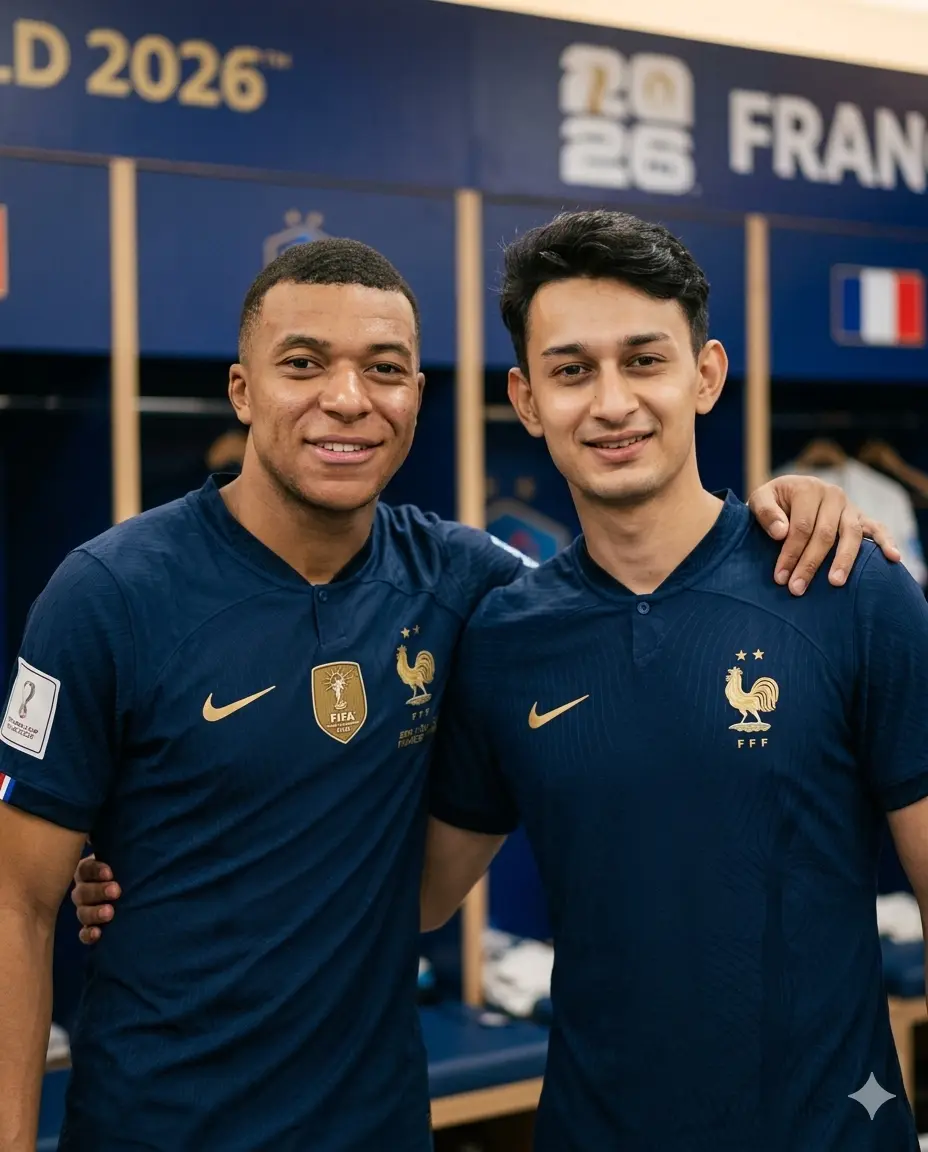
This is a NATURAL CANDID PHOTO — taken by a third person at eye level directly in front. NO PHONE IN FRAME. NO SELFIE ANGLE. I am standing beside Kylian Mbappé inside the France FIFA World Cup 2026 dressing room — casually close, arms around each other, both looking directly at camera with natural genuine smiles — a real photo taken by someone standing in front of us.
Both wearing France 2026 official jersey — deep navy blue, FFF badge on chest, FIFA World Cup 2026 patch on sleeve. Mbappé post-match natural — real hair, relaxed youthful face, genuine smile — not styled or posed.
Composition: portrait close-up — chest up, straight eye level, both faces fully visible and front facing. No phone anywhere in image. Natural comfortable posture — slight lean into each other.
Background: France dressing room — navy blue color scheme, cubicles blurred, FIFA 2026 France branding softly out of focus. Warm ambient indoor lighting.
Skin rendering — CRITICAL: Mbappé’s natural skin tone — real pores, authentic youthful features, post-match naturalness. My skin identical to uploaded photo. Zero AI smoothing on any face.
Lighting: soft warm dressing room ambient lights — gentle fill, no flash, no harsh shadows — real indoor candid photography.
Shot on Canon EOS R5, 50mm lens, f/1.8, ISO 1600. Natural grain. Both faces sharp. Background blurred. Warm realistic tones.
Mood: young genuine happiness — quiet France dressing room moment — real candid natural photo.
Ultra realistic, 8K resolution, professional photography, sharp focus, masterpiece quality, human-taken feel — not AI generated.
Gemini AI Prompt
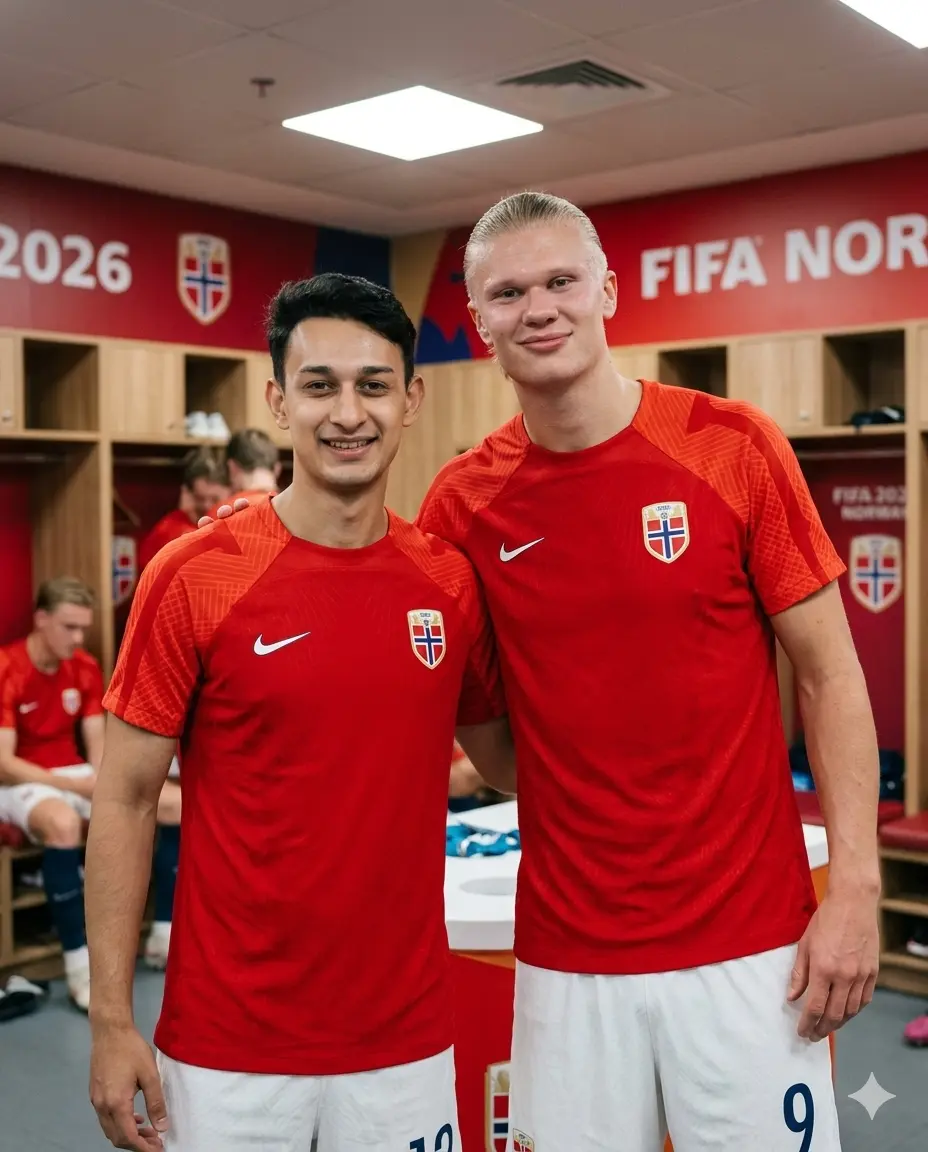
Photo with Erling Haaland in Norway Dressing Room
Use my uploaded photo as reference. Preserve the exact face, skin tone, facial features, and identity — no alterations. Do not change my face, do not replace me, do not generate a new person — I must appear exactly as I look in my uploaded photo.
IMAGE FORMAT: Portrait 4:5 vertical ratio — optimized for Instagram portrait post.
This is a NATURAL CANDID PHOTO — taken by a third person at eye level directly in front. NO PHONE IN FRAME. NO SELFIE ANGLE. I am standing beside Erling Haaland inside the Norway FIFA World Cup 2026 dressing room — Haaland’s tall frame naturally visible, he leans slightly down comfortable beside me, both looking directly at camera, genuine relaxed smiles — a real photo taken by someone in front of us.
Both wearing Norway 2026 official jersey — deep red with white trim, NFF badge on chest, FIFA World Cup 2026 patch on sleeve. Haaland post-match — natural hair, slight tiredness, genuine smile — real human not advertisement.
Composition: portrait close-up — chest up, eye level straight on, both faces clearly visible front facing. Natural height difference visible. No phone. No selfie angle. Comfortable natural body language.
Background: Norway dressing room — red and white colors, cubicles blurred, FIFA 2026 Norway branding softly out of focus. Warm indoor ambient lighting.
Skin rendering — CRITICAL: Haaland’s natural fair skin — real pores, post-match slight tiredness, authentic features. My skin exactly as uploaded photo. No beauty filter, no smoothing.
Lighting: soft warm dressing room overhead lights — gentle ambient glow, no harsh flash — real indoor photo feel.
Shot on Canon EOS R5, 50mm lens, f/1.8, ISO 1600. Natural grain. Both faces sharp. Background soft. Warm tones.
Mood: gentle giant and teammate — quiet genuine post-match happiness — real candid natural photo.
Ultra realistic, 8K resolution, professional photography, sharp focus, masterpiece quality, human-taken feel — not AI generated.
Gemini AI Prompt
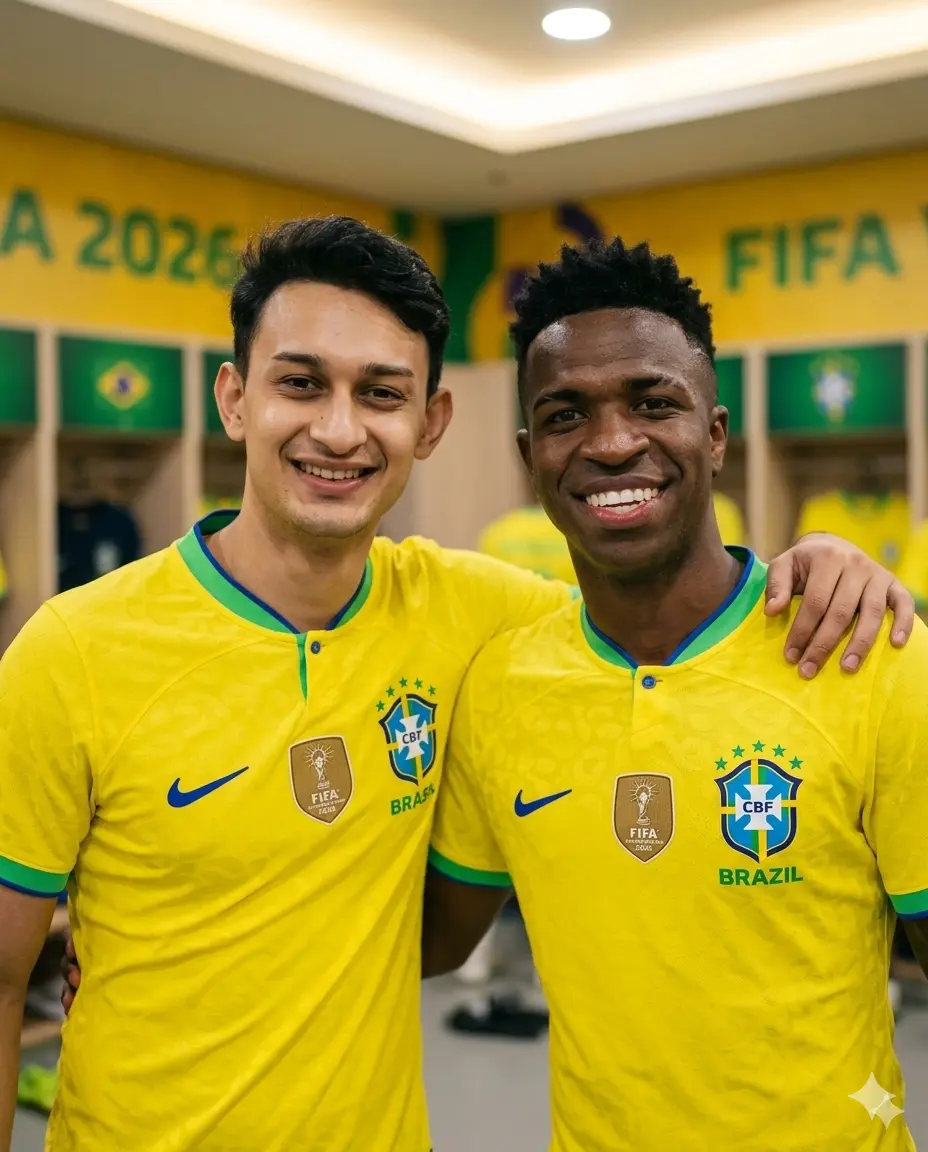
Photo with Vinicius Jr. in Brazil Dressing Room
Use my uploaded photo as reference. Preserve the exact face, skin tone, facial features, and identity — no alterations. Do not change my face, do not replace me, do not generate a new person — I must appear exactly as I look in my uploaded photo.
IMAGE FORMAT: Portrait 4:5 vertical ratio — optimized for Instagram portrait post.
This is a NATURAL CANDID PHOTO — taken by a third person at eye level directly in front. NO PHONE IN FRAME. NO SELFIE ANGLE. I am standing beside Vinicius Jr. inside the Brazil FIFA World Cup 2026 dressing room — arms casually around each other, both looking directly at camera with big genuine smiles — a real photo taken by someone standing in front of us at eye level.
Both wearing Brazil 2026 official jersey — canary yellow with green collar, CBF badge on chest, FIFA World Cup 2026 patch. Vinicius post-match natural — real hair, relaxed wide smile, authentic warm energy.
Composition: portrait close-up — chest up, straight eye level, both faces fully front facing and visible. No phone anywhere. Natural warm body language — comfortable, relaxed.
Background: Brazil dressing room — yellow and green colors throughout, cubicles blurred, FIFA 2026 Brazil branding softly out of focus. Warm indoor lighting.
Skin rendering — CRITICAL: Vinicius’s natural skin tone — real pores, authentic features, post-match warmth. My skin identical to uploaded photo. Zero AI processing on any face.
Lighting: soft warm dressing room ambient lights — gentle overhead glow, no flash, no harsh shadows.
Shot on Canon EOS R5, 50mm lens, f/1.8, ISO 1600. Natural grain. Both faces sharp. Background soft. Warm yellow-toned environment.
Mood: samba happiness — genuine warm post-match photo — real candid natural moment.
Ultra realistic, 8K resolution, professional photography, sharp focus, masterpiece quality, human-taken feel — not AI generated.
Gemini AI Prompt
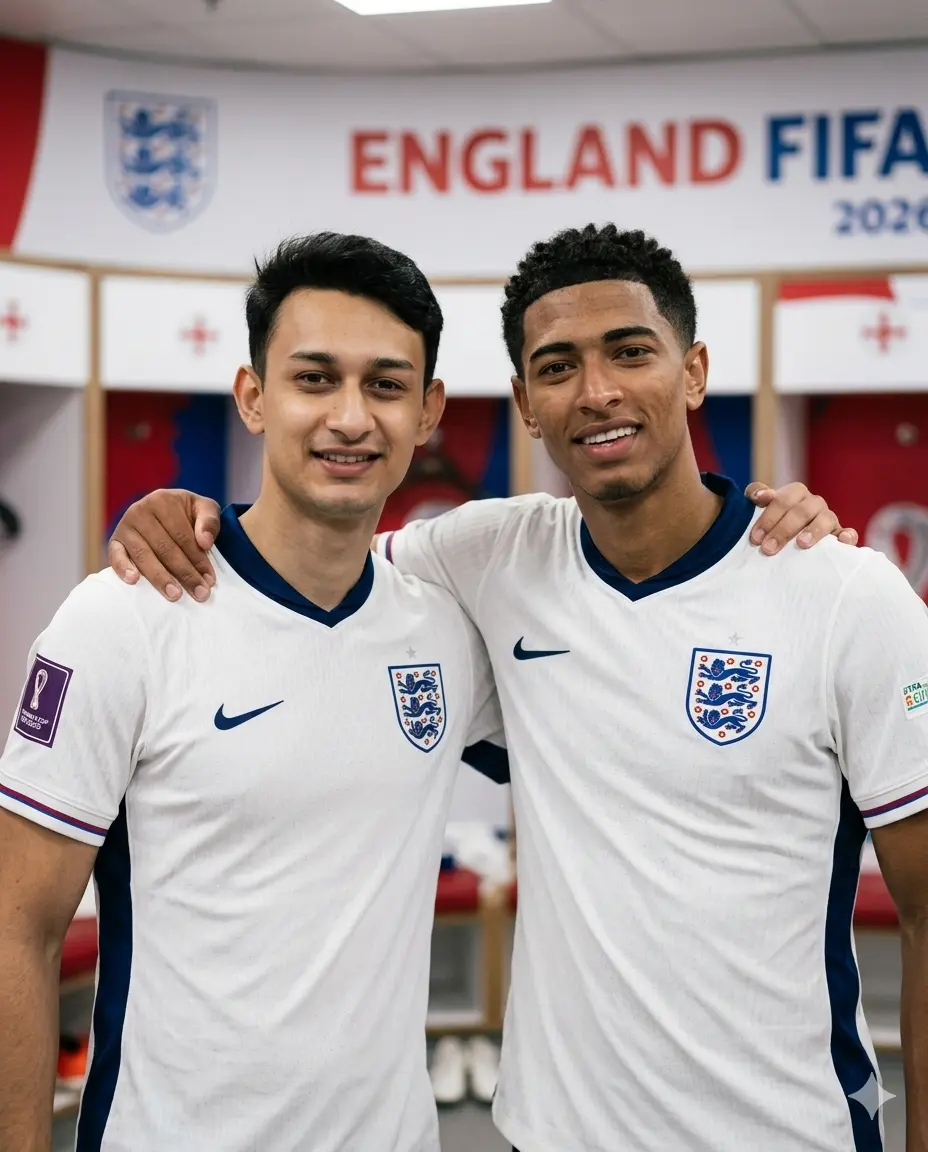
Photo with Jude Bellingham in England Dressing Room
Use my uploaded photo as reference. Preserve the exact face, skin tone, facial features, and identity — no alterations. Do not change my face, do not replace me, do not generate a new person — I must appear exactly as I look in my uploaded photo.
IMAGE FORMAT: Portrait 4:5 vertical ratio — optimized for Instagram portrait post.
This is a NATURAL CANDID PHOTO — taken by a third person at eye level in front. NO PHONE IN FRAME. NO SELFIE ANGLE. I am standing beside Jude Bellingham inside the England FIFA World Cup 2026 dressing room — casually close, arm around each other, both looking directly at camera, natural genuine smiles — real photo taken by someone standing in front of us.
Both wearing England 2026 official jersey — classic white, Three Lions badge, FIFA World Cup 2026 patch. Bellingham post-match natural — real hair, relaxed young face, genuine expression.
Composition: portrait close-up — chest up, straight eye level, both faces front facing clearly visible. No phone. Natural comfortable posture.
Background: England dressing room — white and red colors, cubicles blurred, FIFA 2026 England branding out of focus. Warm indoor ambient lighting.
Skin rendering — CRITICAL: Bellingham’s natural skin — real pores, authentic young features. My skin exactly as uploaded photo. No smoothing, no beauty filter.
Lighting: soft warm dressing room lights — gentle fill, no harsh flash — real indoor candid feel.
Shot on Canon EOS R5, 50mm lens, f/1.8, ISO 1600. Natural grain. Both faces sharp. Background blurred. Clean warm tones.
Mood: historic England dressing room — quiet genuine happiness — real candid natural photo.
Ultra realistic, 8K resolution, professional photography, sharp focus, masterpiece quality, human-taken feel — not AI generated.
Gemini AI Prompt
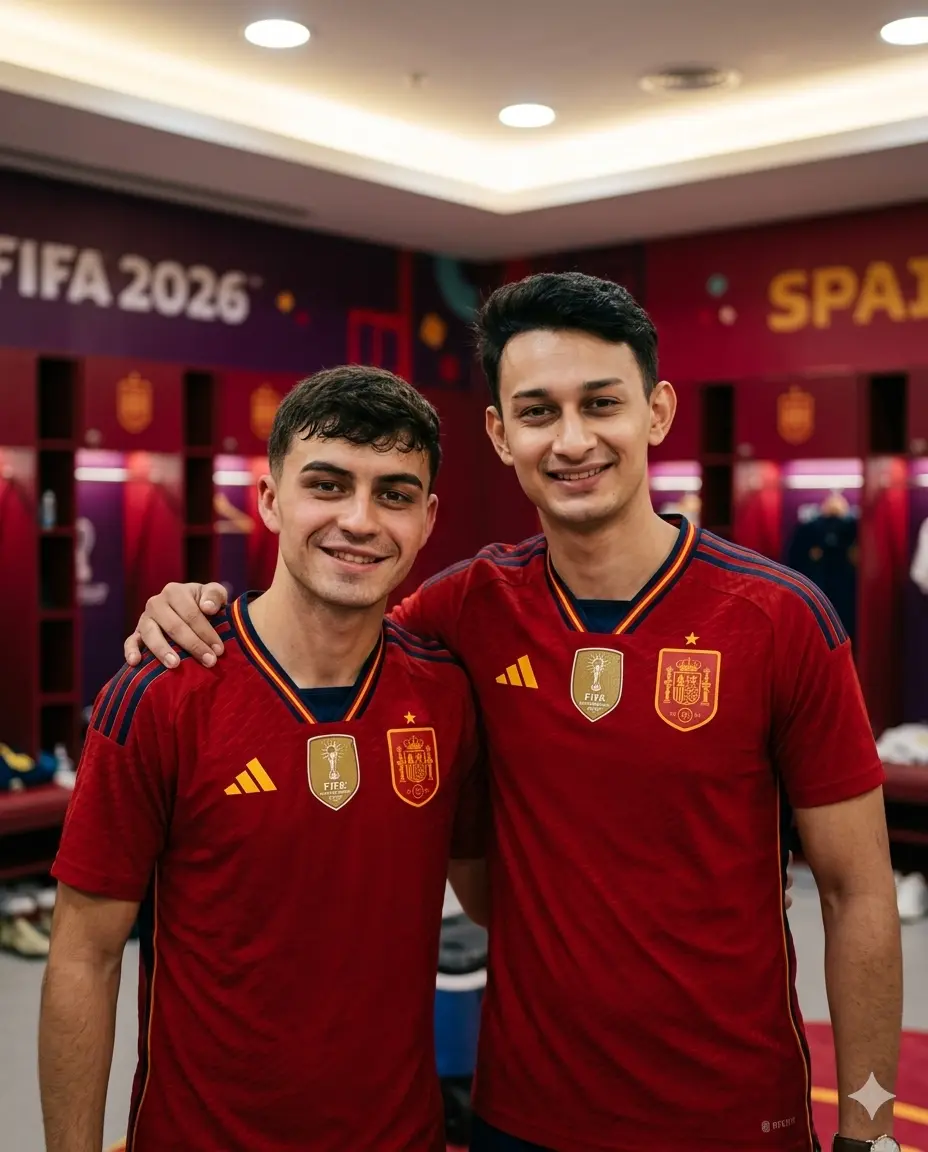
Photo with Pedri in Spain Dressing Room
Use my uploaded photo as reference. Preserve the exact face, skin tone, facial features, and identity — no alterations. Do not change my face, do not replace me, do not generate a new person — I must appear exactly as I look in my uploaded photo.
IMAGE FORMAT: Portrait 4:5 vertical ratio — optimized for Instagram portrait post.
This is a NATURAL CANDID PHOTO — taken by a third person at eye level directly in front. NO PHONE IN FRAME. NO SELFIE ANGLE. I am standing beside Pedri inside the Spain FIFA World Cup 2026 dressing room — arms around each other casually, both looking directly at camera with warm genuine smiles — a real photo taken by someone standing in front of us at eye level.
Both wearing Spain 2026 official jersey — deep red, RFEF badge, FIFA World Cup 2026 patch. Pedri post-match — natural youthful face, real hair, relaxed genuine smile.
Composition: portrait close-up — chest up, straight eye level, both faces fully visible front facing. No phone. Natural easy body language between us.
Background: Spain dressing room — deep red color scheme, cubicles blurred, FIFA 2026 Spain branding softly out of focus. Warm indoor lighting.
Skin rendering — CRITICAL: Pedri’s natural Mediterranean skin — real pores, authentic young features. My skin identical to uploaded photo. Zero AI beauty processing.
Lighting: soft warm dressing room ambient glow — gentle overhead fill, no flash, no harsh shadows.
Shot on Canon EOS R5, 50mm lens, f/1.8, ISO 1600. Natural grain. Both faces sharp. Background soft. Warm red-toned environment.
Mood: young Spain teammates — quiet genuine happiness — real warm candid photo.
Ultra realistic, 8K resolution, professional photography, sharp focus, masterpiece quality, human-taken feel — not AI generated.
Gemini AI Prompt
Photo with Rodri in Spain Dressing Room
Use my uploaded photo as reference. Preserve the exact face, skin tone, facial features, and identity — no alterations. Do not change my face, do not replace me, do not generate a new person — I must appear exactly as I look in my uploaded photo.
IMAGE FORMAT: Portrait 4:5 vertical ratio — optimized for Instagram portrait post.
This is a NATURAL CANDID PHOTO — taken by a third person at eye level directly in front. NO PHONE IN FRAME. NO SELFIE ANGLE. I am standing beside Rodri inside the Spain FIFA World Cup 2026 dressing room — casually beside each other, arm around shoulder, both looking directly at camera with calm genuine smiles — a real photo taken by someone standing in front of us.
Both wearing Spain 2026 official jersey — deep red, RFEF badge, FIFA World Cup 2026 patch. Rodri post-match — natural calm face, slight tiredness in eyes, real quiet smile.
Composition: portrait close-up — chest up, straight eye level, both faces front facing clearly visible. No phone. Calm comfortable natural posture.
Background: Spain dressing room — red color scheme, player cubicles softly blurred, FIFA 2026 branding out of focus. Warm locker room lighting.
Skin rendering — CRITICAL: Rodri’s natural skin — real pores, authentic stubble, post-match tiredness. My skin exactly as uploaded photo. No beauty filter, no smoothing.
Lighting: warm soft dressing room lights — gentle even ambient glow, no flash — real indoor photo feel.
Shot on Canon EOS R5, 50mm lens, f/1.8, ISO 1600. Natural grain. Both faces sharp. Background blurred. Warm tones.
Mood: calm quiet post-match — two Spain teammates — real intimate candid natural photo.
Ultra realistic, 8K resolution, professional photography, sharp focus, masterpiece quality, human-taken feel — not AI generated.
Gemini AI Prompt
Photo with Mohamed Salah in Egypt Dressing Room
Use my uploaded photo as reference. Preserve the exact face, skin tone, facial features, and identity — no alterations. Do not change my face, do not replace me, do not generate a new person — I must appear exactly as I look in my uploaded photo.
IMAGE FORMAT: Portrait 4:5 vertical ratio — optimized for Instagram portrait post.
This is a NATURAL CANDID PHOTO — taken by a third person at eye level directly in front. NO PHONE IN FRAME. NO SELFIE ANGLE. I am standing beside Mohamed Salah inside the Egypt FIFA World Cup 2026 dressing room — arm casually around each other, both looking directly at camera with warm genuine smiles — a real photo taken by someone standing in front of us at eye level.
Both wearing Egypt 2026 official jersey — white with red collar trim, EFA badge, FIFA World Cup 2026 patch, Salah wearing captain armband. Salah post-match — real beard texture, warm genuine eyes, relaxed natural face.
Composition: portrait close-up — chest up, straight eye level, both faces fully front facing and visible. No phone anywhere. Natural comfortable body language.
Background: Egypt dressing room — white and red color scheme, cubicles blurred, FIFA 2026 Egypt branding softly out of focus. Warm indoor ambient lighting.
Skin rendering — CRITICAL: Salah’s natural skin tone — real pores, authentic beard texture, warm genuine eyes. My skin identical to uploaded photo. Zero AI processing on any face.
Lighting: soft warm dressing room overhead lights — gentle ambient fill, no flash, no harsh shadows — real indoor photo feel.
Shot on Canon EOS R5, 50mm lens, f/1.8, ISO 1600. Natural grain. Both faces sharp. Background soft. Warm white tones.
Mood: historic Egypt dressing room — genuine quiet happiness — real intimate candid photo.
Ultra realistic, 8K resolution, professional photography, sharp focus, masterpiece quality, human-taken feel — not AI generated.
Gemini AI Prompt
Photo with Lamine Yamal in Spain Dressing Room
Use my uploaded photo as reference. Preserve the exact face, skin tone, facial features, and identity — no alterations. Do not change my face, do not replace me, do not generate a new person — I must appear exactly as I look in my uploaded photo.
IMAGE FORMAT: Portrait 4:5 vertical ratio — optimized for Instagram portrait post.
This is a NATURAL CANDID PHOTO — taken by a third person at eye level directly in front. NO PHONE IN FRAME. NO SELFIE ANGLE. I am standing beside Lamine Yamal inside the Spain FIFA World Cup 2026 dressing room — casually close, arm around each other, both looking directly at camera with big natural smiles — a real photo taken by someone standing in front of us.
Both wearing Spain 2026 official jersey — deep red, RFEF badge, FIFA World Cup 2026 patch. Yamal post-match — natural teenage face, real hair, wide genuine smile — youngest star’s authentic happiness.
Composition: portrait close-up — chest up, straight eye level, both faces fully front facing clearly visible. No phone anywhere in image. Natural youthful comfortable body language.
Background: Spain dressing room — deep red color scheme, cubicles with jerseys blurred, FIFA 2026 Spain branding softly out of focus. Warm indoor ambient lighting.
Skin rendering — CRITICAL: Yamal’s natural young skin — real pores, authentic teenage features, no aging, no smoothing. My skin exactly as uploaded photo. Zero AI beauty processing on any face.
Lighting: soft warm dressing room overhead glow — gentle ambient fill, no flash, no harsh shadows — real indoor candid photography feel.
Shot on Canon EOS R5, 50mm lens, f/1.8, ISO 1600. Natural grain. Both faces sharp. Background soft bokeh. Warm red-toned environment.
Mood: youngest star genuine happiness — quiet real dressing room moment — candid, warm, natural.
Ultra realistic, 8K resolution, professional photography, sharp focus, masterpiece quality, human-taken feel — not AI generated.
How to use these Gemini AI FIFA 2026 prompts
Using these prompts takes less than two minutes if you follow these steps carefully:
Open Gemini. Go to gemini.google.com and sign in with your Google account. Make sure you are using Gemini 2.0 Flash or Gemini 1.5 Pro, as both handle image uploads well.
Upload your photo. Click the image upload icon in the chat box. Upload a clear, front-facing photo of yourself. Good lighting and a plain background in your upload photo will give Gemini the best reference for your face and skin tone.
Copy the prompt you want. Choose your player from the list above. Copy the full prompt text for that player.
Paste and submit. Paste the full prompt into the Gemini chat box alongside your uploaded photo. Hit enter and let Gemini process the image. This usually takes 10 to 30 seconds.
Review your result. Check that your face is sharp, your skin tone matches, and the background dressing room looks realistic. The jersey color and player identity should match the prompt you chose.
Refine if the face changes. If Gemini altered your face slightly, type a follow-up message: “Keep my face exactly as in the uploaded photo, same skin tone, do not change my facial features.” Resubmitting with this note usually corrects it.
If you want a prompt built around your own outfit color and pose preference, use our Gemini Prompt Generator on this page.
Tips for best results
1. Upload the clearest photo you have. Use a recent, well-lit, front-facing photo where your full face is visible. Avoid sunglasses, heavy shadows across your face, or blurry images. The sharper and cleaner your uploaded photo, the more accurately Gemini will preserve your features in the final result.
2. Make sure your face is fully visible in the upload. Avoid photos where your face is partially covered, turned to the side, or cut off at the edges. A chest-up portrait works best. If your original photo has a busy background, that is fine. Gemini will replace the background using the prompt details anyway.
3. If Gemini changes your face, add one correction line. Type: “Do not change my face. Use my uploaded photo as the only reference for my face and skin tone.” Paste this as a follow-up message after your first result. This small addition consistently improves face accuracy across most Gemini sessions.
Related prompts you might also like
If you enjoyed these prompts, here are some other styles you might love:
How do I use a Gemini AI FIFA 2026 prompt to put myself in a photo with a football player?
Open Gemini at gemini.google.com, upload a clear front-facing photo of yourself, then paste the full prompt for your chosen player into the chat box alongside the photo. Submit and Gemini will generate a realistic dressing room photo with you and the player. If your face changes in the result, add a follow-up message asking Gemini to preserve your uploaded face exactly.
Why does Gemini keep changing my face when I use these FIFA 2026 prompts?
Gemini sometimes generates a new face instead of using your uploaded photo, especially if your upload is low quality, partially covered, or taken at an angle. To fix this, use a bright, sharp, front-facing photo with your full face visible. Also add this line after your result: “Do not change my face. Use only my uploaded photo as face reference.” This correction usually works within one or two retries.
Which photo should I upload to get the best result with these Gemini prompts?
Upload a recent, clear, well-lit photo where your face is fully visible from the front. A chest-up portrait taken in natural daylight works best. Avoid group photos, sunglasses, heavy shadows, or photos where you are turned sideways. The better your upload photo, the more accurately Gemini will match your skin tone and facial features in the final FIFA dressing room image.
Can I use this Gemini prompt to get a photo with Salah or Messi wearing a specific kit number?
The prompts as written use the official 2026 national team jersey colors and badges. They do not specify a kit number, which keeps the result more natural and avoids Gemini struggling with realistic number rendering. If you want to customize further, try adding “jersey number 10 on the back” to the prompt.
How do I share my FIFA 2026 Gemini AI photo on Instagram?
Once Gemini generates your result, download the image directly from the Gemini chat interface. Each prompt in this pack is set to a 4:5 vertical ratio, which is the ideal format for an Instagram portrait post. Go to Instagram, tap the plus icon, select your downloaded image, and post without cropping. The warm indoor dressing room tones and sharp face rendering look excellent on mobile screens.
Conclusion
You now have ten complete Gemini AI Boys FIFA 2026 prompts ready to use, covering the biggest names in international football from Ronaldo and Messi to Salah, Yamal, and Haaland. Each prompt is built to keep your face accurate, your skin tone real, and the dressing room background authentic to the national team. Copy any prompt, upload your photo, and you will have a dressing room shot that looks like it was taken on matchday. Want something more personal? Head over to our free Custom Prompt Generator and build a version around your own preferences in under a minute. Try one of these prompts today and drop your result in the comments below or tag us on Instagram. We would love to see which player you chose.