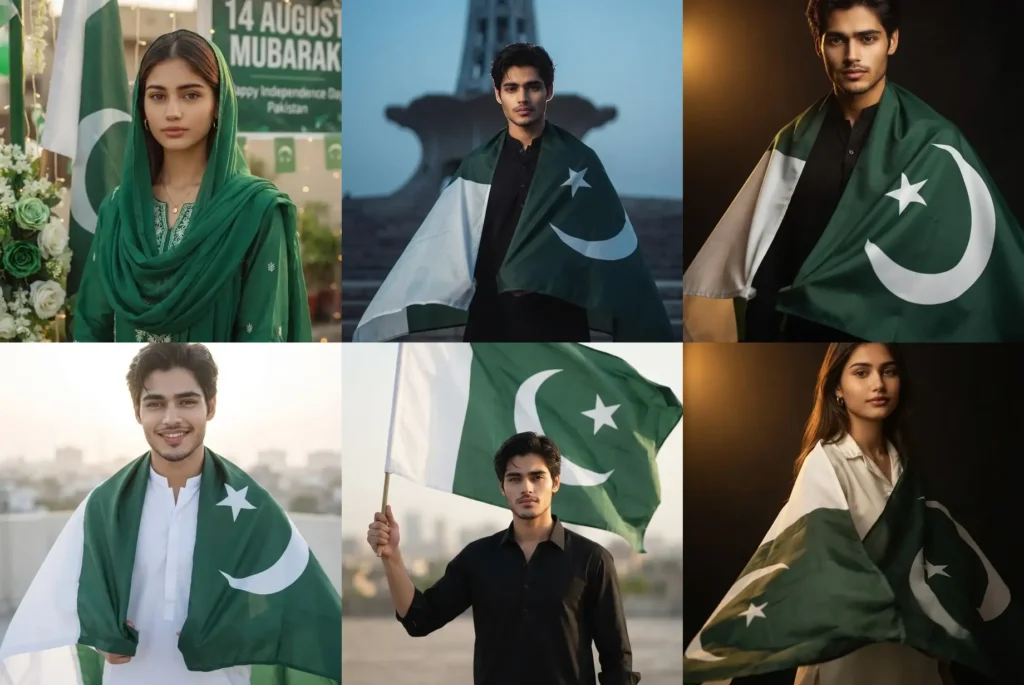
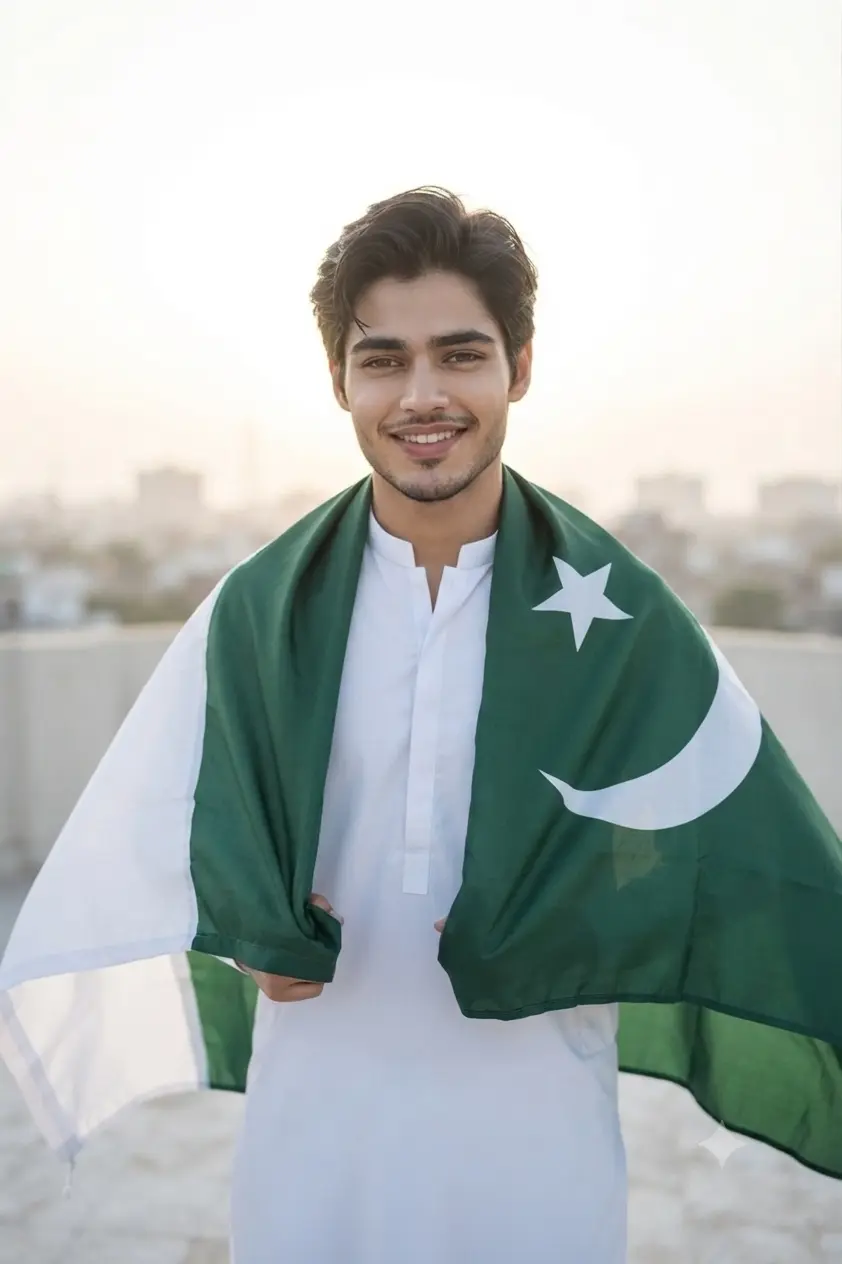
Every year on 14 August, Pakistan celebrates its Independence Day, and social media fills up with people posting flag portraits, patriotic outfits, and celebration pictures to mark the occasion. Turning your own photo into one of these looks with AI sounds simple, but most attempts fall apart on one detail: the flag itself. Ask an AI model for “a Pakistan flag” without being specific, and it will often invent its own version, with the crescent facing the wrong way, the stripe missing, or the proportions off.
The prompts in this collection were written to avoid that problem. Each one spells out exactly how the flag should look, alongside a proper lighting setup, whether that’s the warm glow of golden hour, the blue tones of dusk near a monument, or soft natural light on a rooftop. The result feels closer to an actual photoshoot than a quick filter effect. There are looks here for both men and women, from an editorial flag cape at Minar e Pakistan to a simple, confident studio portrait, so you can pick whichever style fits how you want to celebrate this year.
Independence Day Gemini Prompts for Girls
Gemini AI Prompt
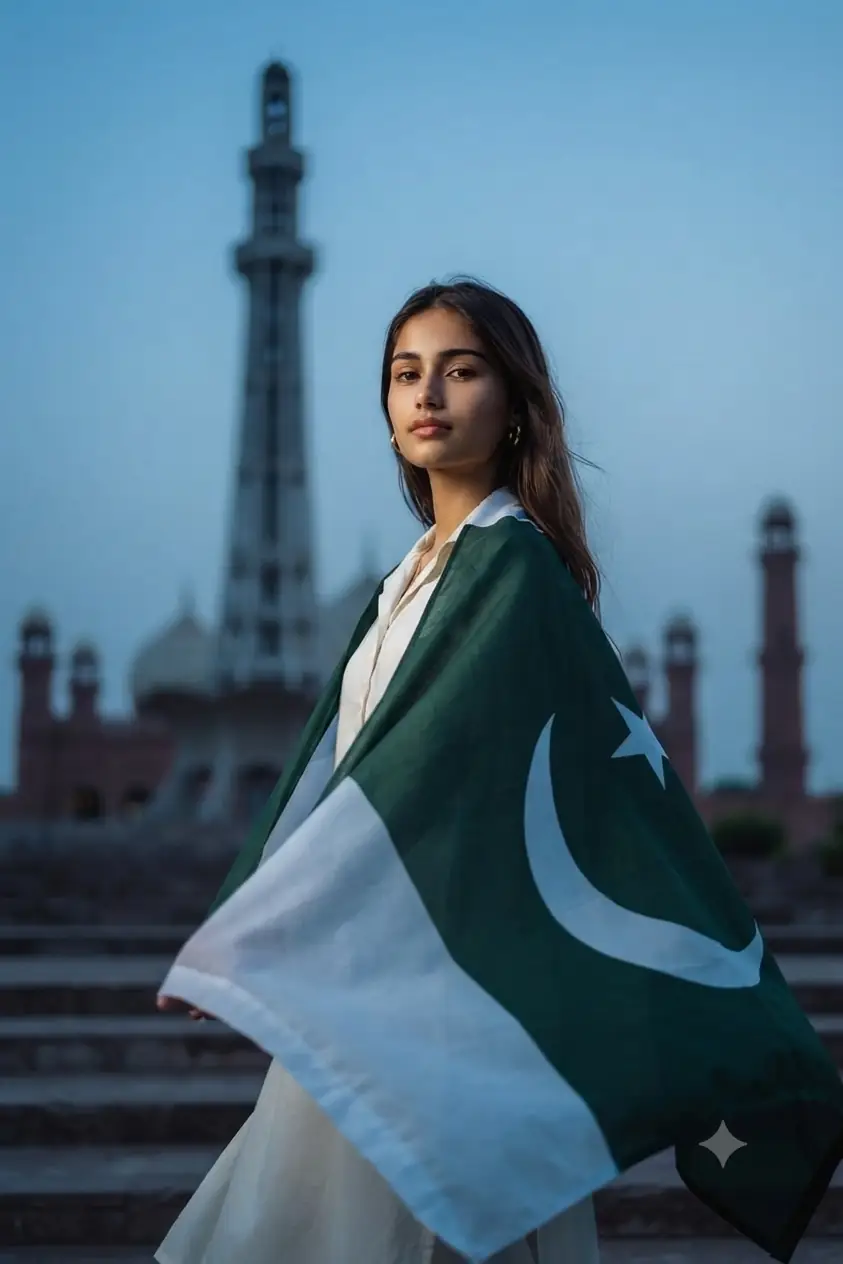
Pakistani Flag Cape at Minar-e-Pakistan (Cinematic Dusk Look)
Use my uploaded photo as reference. Preserve exact face, skin tone, and features. Transform the style into a high-end editorial cover-shoot look. Outfit: modest white or ivory kurta as the base, with the Pakistani flag draped from the shoulders down the back, sweeping open at the front like a cape caught in motion — elegant, not wrapped tightly. Location: steps of an iconic Pakistani monument at dusk (Minar-e-Pakistan or Badshahi Mosque silhouette), softly blurred behind. Lighting: dramatic single-source key light on the face, cool dusk-blue sky blending with warm rim light along the flag’s edge, subject glowing against twilight architecture. Camera: Canon EOS R5, 85mm f/1.4 lens, shallow depth of field, monument softly bokeh’d. Mood: cinematic, proud, dignified — flag flowing as if lifted by wind, calm confident gaze. Color tone: cool twilight blues contrasted with deep green, white, and warm skin tones. 8K ultra realistic, professional photography quality, human-taken feel, sharp focus, masterpiece.
Gemini AI Prompt
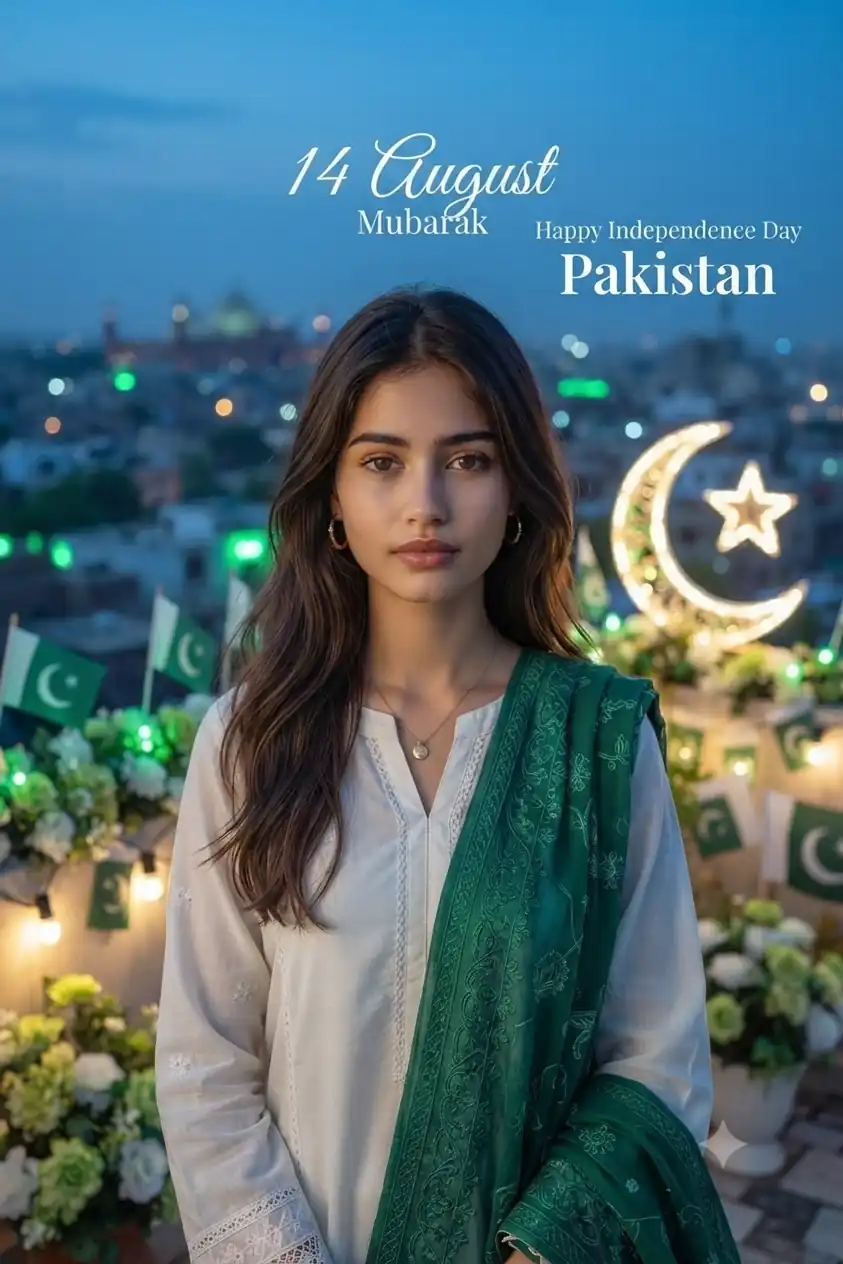
Rooftop 14 August Celebration
Use my uploaded photo as reference. Preserve exact face, skin tone, and features.
Create a graceful Pakistani woman wearing a modest white traditional outfit with an emerald-green embroidered dupatta. Her hair is naturally styled and her appearance is elegant and sophisticated. Place her on a beautiful rooftop decorated for 14th August Independence Day, with Pakistani flags, green-and-white flowers, glowing string lights, and a large crescent-and-star decoration. Show a softly illuminated Pakistani city skyline in the background. Add tasteful text reading “14 August Mubarak” and “Happy Independence Day Pakistan.” Use cinematic blue-hour lighting with soft green highlights and warm facial illumination.
Camera: Canon EOS R5, 85mm f/1.4 lens, shallow depth of field.
Mood: peaceful, emotional, proud, patriotic, cinematic.
8K ultra realistic, professional photography quality, human-taken feel, sharp focus, masterpiece.
Gemini AI Prompt
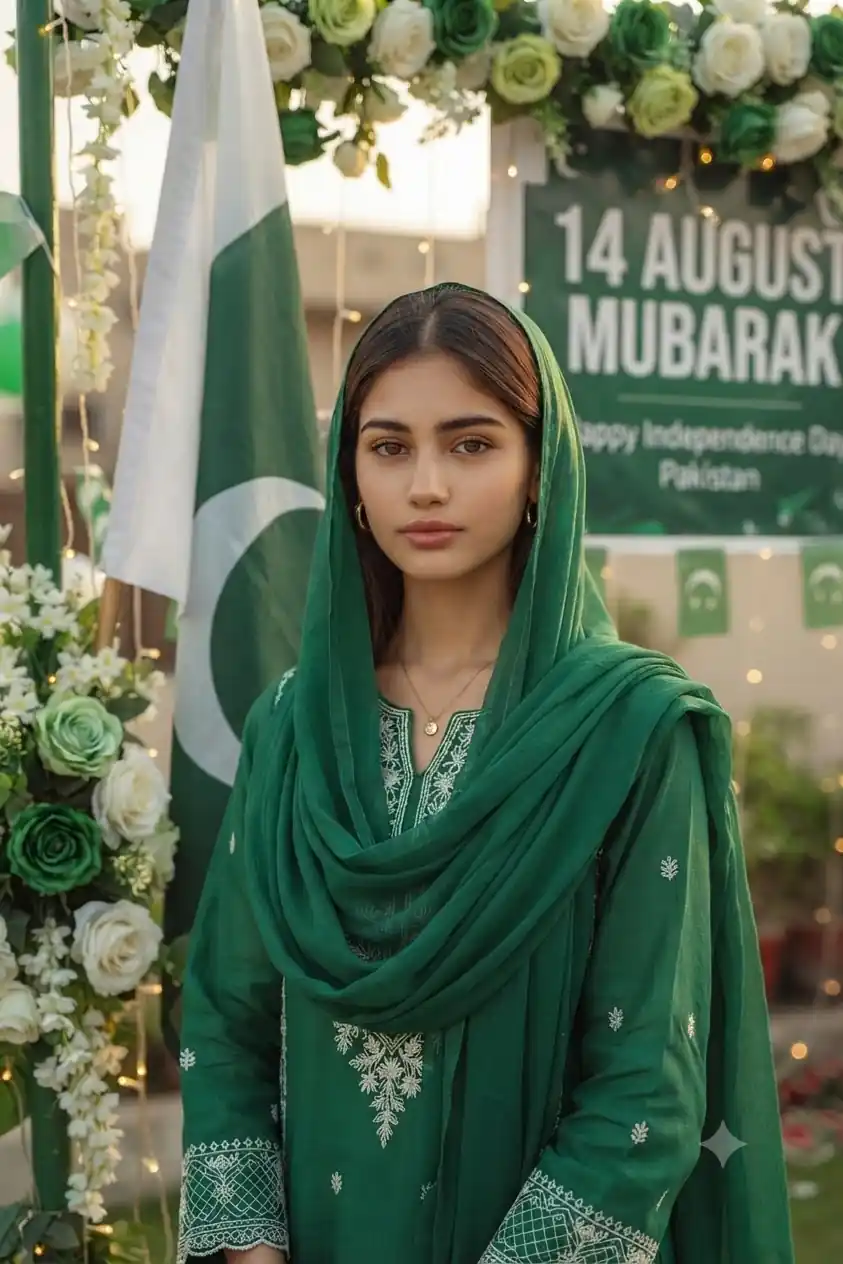
Elegant Green Traditional Look
Use my uploaded photo as reference. Preserve exact face, skin tone, and features.
Create a graceful Pakistani woman wearing an elegant emerald-green traditional shalwar kameez with delicate white embroidery and a matching flowing dupatta. Keep the outfit modest, sophisticated, and festive. Place her in a beautifully decorated Independence Day setting with a large Pakistani flag beside her, subtle green-and-white flowers, crescent-and-star decorations, and soft glowing lights. Add tasteful text in the background: “14 August Mubarak” and smaller text: “Happy Independence Day Pakistan.” Use soft golden-hour lighting with natural highlights on her face and fabric.
Camera: Canon EOS R5, 85mm f/1.4 lens, shallow depth of field.
Mood: graceful, proud, peaceful, patriotic, celebratory.
8K ultra realistic, professional photography quality, human-taken feel, sharp focus, masterpiece.
Gemini AI Prompt
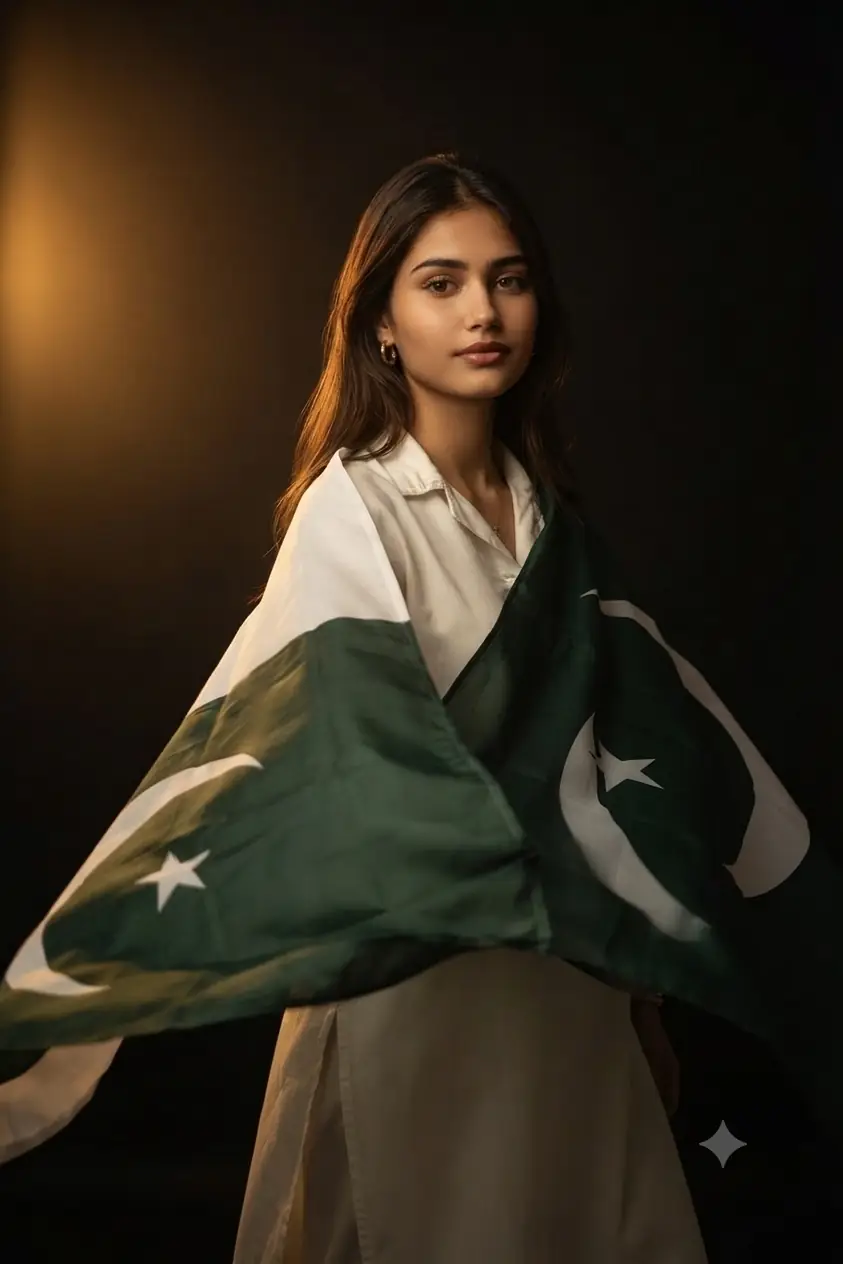
Flag Cape Studio Portrait (Golden Hour Edition)
Use my uploaded photo as reference. Preserve exact face, skin tone, and features. Transform the style into a cinematic patriotic portrait with a warm, editorial studio finish. Outfit: wear a modest, elegant outfit (white or pastel kurta) as the base, with the Pakistani flag (deep green, white crescent-and-star panel) draped over the shoulders from behind like a cape, flowing open at the front rather than wrapped across the chest — giving movement and grandeur without covering the outfit. Location: same dark studio backdrop, now lit as if late-evening golden light spills in from one side, warm amber glow against black. Lighting: soft golden-hour key light from the left, rim light tracing the flag’s edges and hair, deep shadows for contrast. Camera: Canon EOS R5, 85mm f/1.4 lens, shallow depth of field, subject tack-sharp against a softly blurred dark background. Mood: graceful, proud, quietly powerful — flag caught mid-motion as if moved by a breeze, gentle confident expression. Color tone: warm amber highlights against black, rich green and white. 8K ultra realistic, professional photography quality, human-taken feel, sharp focus, masterpiece.
Independence Day Gemini Prompts for Boys
Gemini AI Prompt
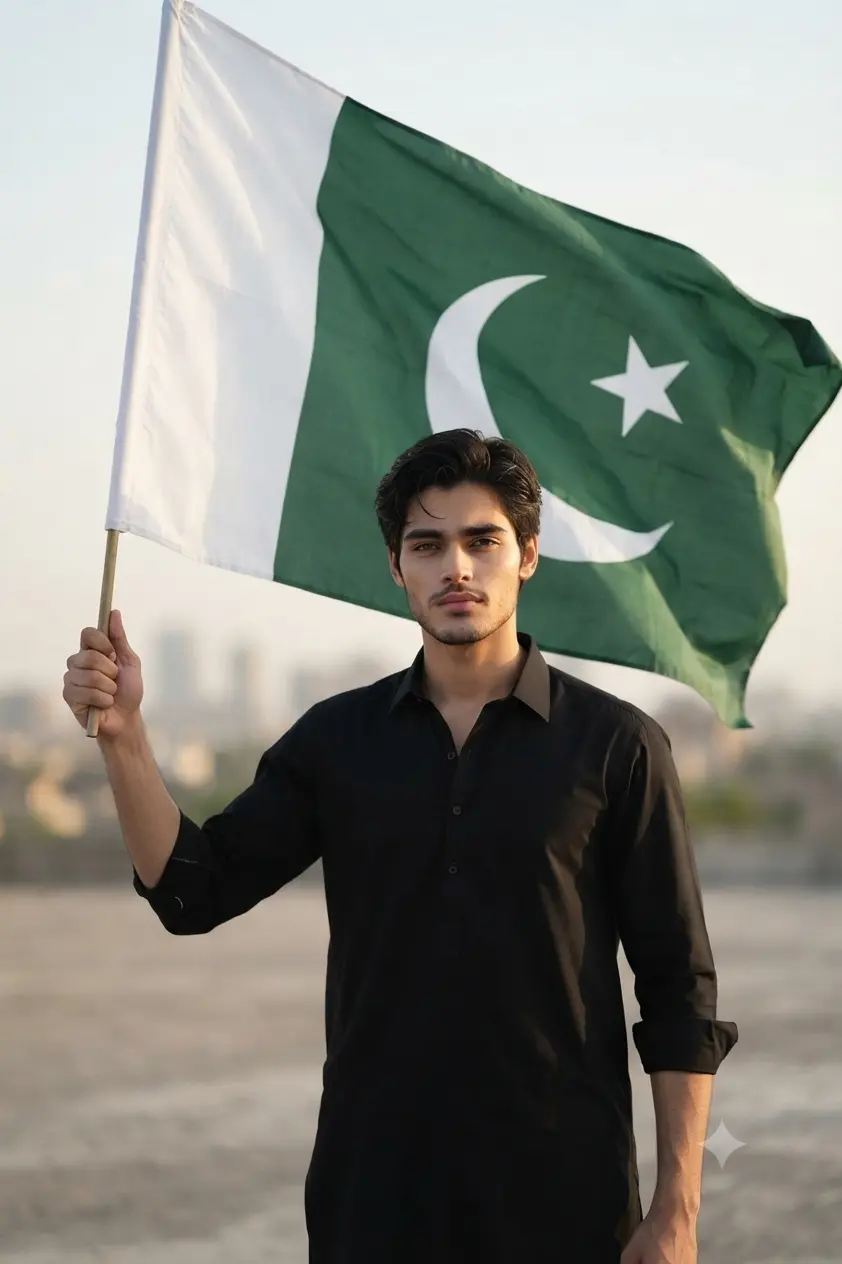
Pakistan Flag Portrait AI Prompt – Bold & Patriotic Look for Men
Use my uploaded photo as reference. Preserve exact face, skin tone, and features. Transform the style into a strong, determined patriotic portrait. Outfit: a plain black or white kurta/shirt, sleeves slightly rolled up, simple and modest. Pose: subject holding a large, oversized Pakistan flag raised firmly in one hand, the flag taking up a bold portion of the frame, fabric flowing and rippling dramatically with the wind — official flag design: dark green field covering three-quarters of the fabric, white vertical stripe on the hoist (left) side, white crescent moon facing right with a five-pointed white star centered above it, large and clearly visible, accurate proportions, no distortion. Location: an open outdoor space during late afternoon, soft blurred skyline or open field in the background. Lighting: soft directional sunlight from the side, subtle shadows defining facial structure and flag folds, natural even tone. Camera: Canon EOS R5, 85mm f/1.4 lens, shallow depth of field, background softly blurred, flag sharply in focus. Mood: serious, determined, resolute — no smile, focused steady gaze straight ahead or slightly off-camera, sense of quiet strength. Color tone: natural warm tones against vibrant green and white flag colors. Ensure the flag design is historically and geometrically accurate. 8K ultra realistic, professional photography quality, human-taken feel, sharp focus, masterpiece.
Gemini AI Prompt
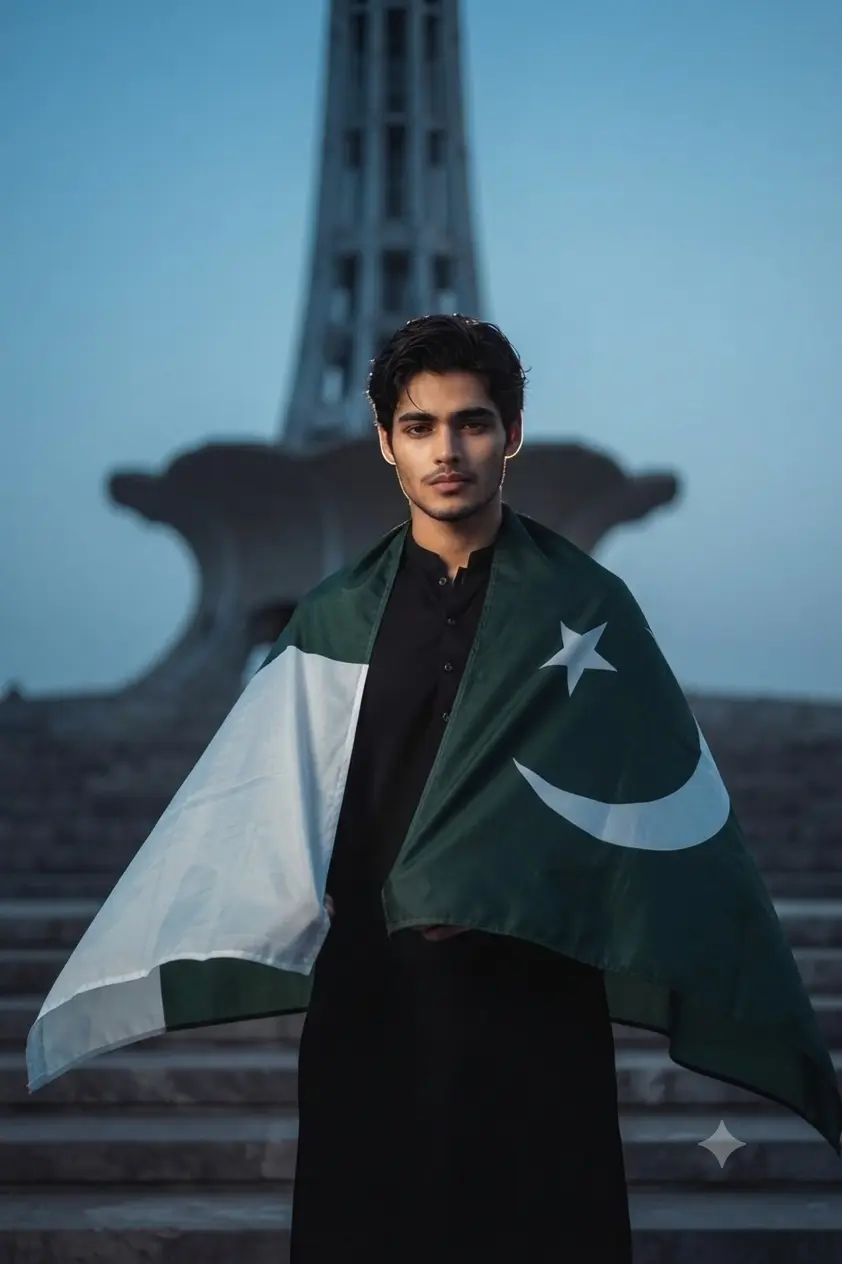
Cinematic Minar-e-Pakistan Look for Men
Use my uploaded photo as reference. Preserve exact face, skin tone, and features. Transform the style into a high-end editorial cover-shoot look. Outfit: sharp black or white kurta as the base, with the official flag of Pakistan draped as a cape from the shoulders: dark green field covering three-quarters of the fabric, white vertical stripe on the hoist (left) side, white crescent moon facing right with a five-pointed white star centered above it in the middle of the green field — accurate proportions, no distortion. Flag sweeps open at the front like a cape caught in motion. Location: steps of an iconic Pakistani monument at dusk (Minar-e-Pakistan or Badshahi Mosque silhouette), softly blurred behind. Lighting: dramatic single-source key light on the face, cool dusk-blue sky blending with warm rim light along the flag’s edge, subject glowing against twilight architecture. Camera: Canon EOS R5, 85mm f/1.4 lens, shallow depth of field, monument softly bokeh’d. Mood: cinematic, proud, dignified, strong steady gaze. Color tone: cool twilight blues contrasted with deep green, white, and warm skin tones. Ensure the flag design is historically and geometrically accurate — do not alter the crescent orientation, star shape, or stripe ratio. 8K ultra realistic, professional photography quality, human-taken feel, sharp focus, masterpiece.
Gemini AI Prompt
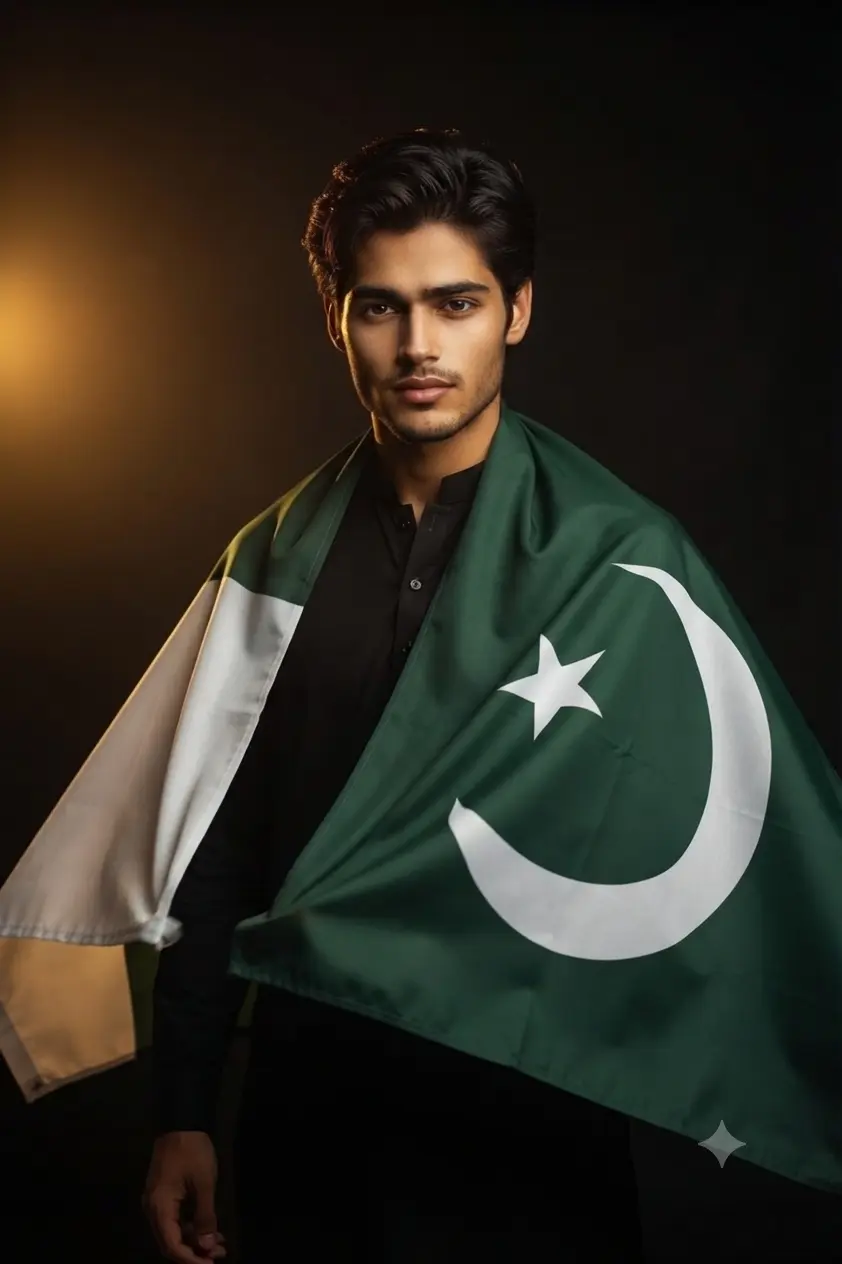
Golden Hour Studio Look for Men
Use my uploaded photo as reference. Preserve exact face, skin tone, and features. Transform the style into a cinematic patriotic portrait with a warm, editorial studio finish. Outfit: a crisp white or black kurta/shalwar kameez as the base, with the official flag of Pakistan draped as a cape from behind the shoulders: dark green field covering three-quarters of the fabric with a white vertical stripe on the hoist (left) side, a white crescent moon facing right and a five-pointed white star centered above it in the middle of the green field — accurate proportions, no distortion. Flag flows open at the front like a cape caught in motion. Location: dark studio backdrop, lit as if late-evening golden light spills in from one side, warm amber glow against black. Lighting: soft golden-hour key light from the left, rim light tracing the flag’s edges and hair, deep shadows for contrast. Camera: Canon EOS R5, 85mm f/1.4 lens, shallow depth of field, subject tack-sharp against a softly blurred dark background. Mood: strong, proud, quietly powerful, confident calm expression. Color tone: warm amber highlights against black, rich green and white. Ensure the flag design is historically and geometrically accurate — do not alter the crescent orientation, star shape, or stripe ratio. 8K ultra realistic, professional photography quality, human-taken feel, sharp focus, masterpiece.
Gemini AI Prompt
Rooftop Sunrise Look for Men
Use my uploaded photo as reference. Preserve exact face, skin tone, and features. Transform the style into a natural outdoor patriotic portrait, bold and free-flowing. Outfit: plain white kurta or shirt as the base, with the official flag of Pakistan draped as a cape from behind the shoulders: dark green field covering three-quarters of the fabric, white vertical stripe on the hoist (left) side, white crescent moon facing right with a five-pointed white star centered above it in the middle of the green field — accurate proportions, no distortion. Flag opens at the front, catching the breeze like a cape. Location: an open terrace or rooftop at sunrise, soft city skyline in the distance. Lighting: natural soft morning sunlight, gentle backlight glowing through the flag’s edges and hair, diffused shadows. Camera: Canon EOS R5, 85mm f/1.4 lens, shallow depth of field, background softly blurred. Mood: hopeful, determined, quietly patriotic, genuine confident smile. Color tone: soft pastel morning light with vibrant green accents against white. Ensure the flag design is historically and geometrically accurate — do not alter the crescent orientation, star shape, or stripe ratio. 8K ultra realistic, professional photography quality, human-taken feel, sharp focus, masterpiece.
How to Create Your 14 August AI Photo
Start with a clear, front facing reference photo. The identity lock instruction in each prompt depends on the AI being able to see your face properly, so avoid sunglasses, heavy shadows, or a blurry source image.
For the two decorated rooftop scenes, the ones with on image text like “14 August Mubarak,” the generated text can sometimes come out misspelled or oddly placed. If that happens, simply regenerate once or twice, or ask the model to leave the text out entirely if it keeps struggling.
The flag cape prompts occasionally get the crescent direction backwards or drop the white stripe near the pole. If the flag looks off, regenerate and just remind the model directly that the crescent faces right and the white stripe sits on the left.
For the studio portraits with the plain dark background, a busy or cluttered background in your original photo can sometimes bleed through into the result, so a simple source image works best.
Tips to Get Realistic 14th August Photo Prompt Results
The prompt with the large flag held in one hand works noticeably better when the reference photo shows both arms clearly. A tightly cropped headshot leaves the AI guessing at arm position, and that guess isn’t always a good one.
For the monument based prompts, daylight reference photos gave better results than dim or low light ones, simply because the model has more facial detail to carry over once it recreates the dusk lighting.
The women’s rooftop prompts render skin tone most naturally from an unfiltered photo. Heavily filtered selfies tend to wash out the warm facial lighting these prompts are going for.
Frequently Asked Questions
Can the same 14 August AI photo be used for a DP and a WhatsApp status?
Yes. For a profile picture, just crop the generated image into a square afterward. For a status, keeping the original portrait orientation works better since it shows the flag and background detail in full.
Why does the flag sometimes come out wrong, with the crescent facing the wrong way or a stripe missing?
This usually happens when the AI treats “Pakistan flag” as a general idea instead of following an exact layout, which is why these prompts describe the crescent direction and stripe placement directly. If it still comes out wrong, just repeat that instruction once more when asking for a redo.
Do I need a professional photo for the Minar-e-Pakistan or Badshahi Mosque background prompts?
No, an ordinary daylight photo works well. The AI replaces the background and lighting completely, so it only needs a clear, well lit view of your face to work from.
Final Thoughts on Independence Photo Prompts 2026
That covers the full set of 14 August AI photo prompts for this year, from editorial flag capes at Minar-e-Pakistan to simple, warm studio portraits for both men and women. Pick whichever one matches the mood you’re going for, paste it into Gemini or ChatGPT along with your photo, and regenerate once or twice if the flag needs fixing. If you end up with one you like, tag us on Instagram at @image_promptlab, we’d genuinely love to see it. Happy Independence Day 2026, Pakistan.