
Introduction
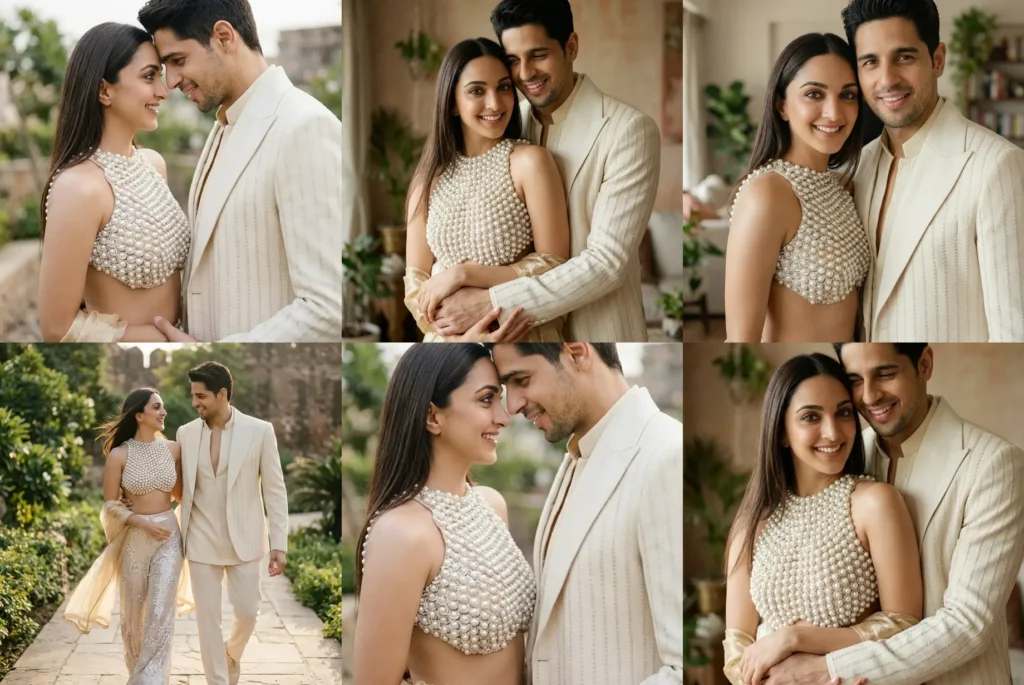
Picture a couple portrait that looks like a professional photographer spent a whole golden hour capturing you and your partner, except there was no camera, no studio, and no waiting around for the perfect light. These romantic couple photo prompts for Gemini AI and ChatGPT make that exact result possible using nothing more than a clear selfie and a few lines of text. This pack includes four ready to use poses, a forehead touch, a relaxed walk together, a warm hug from behind, and a classic look at the camera shot, each written to protect your real facial features while giving the final image a soft, cinematic finish. Whether you are planning an anniversary post, a simple couple portrait for Instagram, or just want to see how you and your partner look together in a dreamy outdoor setting, this guide is for anyone using Gemini AI or ChatGPT to create realistic, romantic couple portraits without booking an actual photo shoot.
How to use these couple photo prompts for Gemini AI
Getting a polished result only takes a few minutes, even if you have never used Gemini before.
- Open the Gemini app or the Gemini website on your phone or computer, and make sure you are signed in to your account.
- Upload a clear photo of yourself and a clear photo of your partner, or one photo of you both together if you already have a good one. Even lighting and a clear view of both faces will always give you a better starting point.
- Copy one of the four prompts exactly as it is written, and paste it into the Gemini chat box right under your uploaded photos.
- Submit the prompt and let Gemini generate the image. This usually takes less than a minute.
- Review the result carefully. Check that both faces still look like you and your partner, that the pose matches what you wanted, and that the overall mood and lighting feel right.
- If anything looks off, especially the face, type a quick follow up message such as “keep both faces exactly as the reference photos, do not change facial features” and ask Gemini to regenerate the image.
If you want a prompt built around your own outfit color and pose preference, use our free Custom Prompt Generator on this page.
Four romantic couple poses to try right now
Each prompt below is ready to copy. Paste it into Gemini or ChatGPT exactly as written, along with clear photos of both people, and let the AI handle the rest.
For a festive night look together, see our Diwali couple photo prompts with diya, balcony lights and sparkler ideas.




Tips for best results
- Always upload a recent, well lit photo where both faces are clearly visible and not covered by sunglasses, hats, or loose hair. A sharp, front facing photo taken in daylight will always give Gemini a stronger reference than a blurry or heavily filtered one.
- Try to choose an original photo with a simple, uncluttered background, since Gemini often blends elements of that setting into the final cinematic look. A plain wall, a garden, or an open outdoor space usually works better than a busy, crowded photo.
- If you want a specific outfit color, add one extra line to the prompt, such as mentioning the exact shade or fabric you want before you submit it. And if Gemini changes the face too much, simply regenerate the image while adding an instruction to strictly preserve the uploaded facial features without any reshaping or beautification.
Related prompts you might also like
If you enjoyed these prompts, here are some other styles you might love. For a bright, nostalgic feel, try the colorful 90s Bollywood poster couple photo prompt, which turns your photo into a fun retro film poster look. If you prefer something softer and dreamier, the cinematic garden portrait couple prompt is perfect for a quiet outdoor setting. And if you want something glamorous for a special occasion, the Met Gala couple photo prompt for 2026 gives your photo a red carpet style transformation.
Frequently asked questions
How do I use these couple photo prompts for Gemini AI?
Simply copy the prompt text exactly as written, upload clear photos of both partners, and paste the prompt into Gemini right after your photos. Submit it and Gemini will generate a romantic couple portrait based on the pose and style described in the prompt.
Why does Gemini sometimes change our faces in the photo?
Gemini occasionally adjusts facial features slightly while building a new scene, especially if the uploaded photo is blurry, dark, or partially covered. You can fix this by asking Gemini to regenerate the image while keeping both faces exactly as shown in the reference photos.
Which photo should I upload for the best Gemini AI couple photo prompt result?
Upload a recent, clear photo where both faces are visible, well lit, and not hidden by sunglasses or heavy shadows. A simple front facing photo usually works better than a group photo or one taken from far away.
Can I share my Gemini AI couple portrait on Instagram?
Yes, these portraits are designed to look polished and realistic enough for Instagram posts, reels, or couple goals carousels. Just download the final image from Gemini and post it the way you would any other photo.
Try these prompts for your own couple portrait
These four poses give you a simple way to create soft, cinematic couple portraits using nothing but a phone selfie and a good prompt. From the gentle forehead touch to the warm hug from behind, each of these couple photo prompts for Gemini AI is built to keep your real faces intact while adding a polished, photo real finish. If you want a version made around your own outfit colors or a pose you already have in mind, try our free Custom Prompt Generator and create something made just for you and your partner. We would love to see how yours turns out, so feel free to share your favorite result in the comments or tag us on Instagram.
Prefer flowers around you? These floral couple photo prompts are soft and dreamy.
Planning your wedding look? These wedding couple photo prompts turn one couple photo into bridal, Nikah, Haldi, Mehndi and reception looks.